<?xml version="1.0" encoding="UTF-8"?>
<!DOCTYPE html
  PUBLIC "-//W3C//DTD XHTML 1.0 Transitional//EN" "http://www.w3.org/TR/xhtml1/DTD/xhtml1-transitional.dtd">
<html xmlns="http://www.w3.org/1999/xhtml"><head><title>transpect Setup Manual</title><link rel="stylesheet" type="text/css" href="dbkhtml.css"/><meta name="generator" content="DocBook XSL Stylesheets V1.78.1"/></head><body><div xml:lang="en" class="book"><div class="titlepage"><div><div><h1 class="title"><a id="d5e1"/>transpect Setup Manual</h1></div><div><div class="author"><h3 class="author"><span class="orgname">le-tex publishing services GmbH</span><div class="address"><p><br/>
                <span class="street">Weißenfelser Str. 84</span><br/>
                <span class="postcode">04229</span><br/>
                <span class="city">Leipzig</span><br/>
                <span class="country">Germany</span><br/>
            </p></div><code class="email">&lt;<a class="email" href="mailto:letexml@le-tex.de">letexml@le-tex.de</a>&gt;</code></h3><code class="email">&lt;<a class="email" href="mailto:letexml@le-tex.de">letexml@le-tex.de</a>&gt;</code></div></div></div><hr/></div><div class="toc"><p><strong>Table of Contents</strong></p><dl class="toc"><dt><span class="preface"><a href="#d5e12">About le-tex transpect</a></span></dt><dt><span class="preface"><a href="#d5e46">About this Manual</a></span></dt><dt><span class="chapter"><a href="#concepts">1. Concepts</a></span></dt><dd><dl><dt><span class="section"><a href="#sec-cascade">The Configuration Cascade: Content in Clades</a></span></dt><dd><dl><dt><span class="section"><a href="#d5e60">Hierarchical Organization vs. Content Tagging</a></span></dt><dt><span class="section"><a href="#d5e70">Inheritance by <code class="code">xsl:import</code></a></span></dt><dt><span class="section"><a href="#d5e77">Dynamic Assembly</a></span></dt><dt><span class="section"><a href="#d5e103">Clades</a></span></dt><dt><span class="section"><a href="#sec-cascade-clade-selection">How a Clade is Selected for Given Content</a></span></dt><dt><span class="section"><a href="#d5e172">Example: Unionsverlag</a></span></dt></dl></dd></dl></dd><dt><span class="chapter"><a href="#system">2. System requirements</a></span></dt><dt><span class="chapter"><a href="#setup">3. Setting up a transpect project</a></span></dt><dt><span class="chapter"><a href="#examples">4. Examples</a></span></dt><dd><dl><dt><span class="section"><a href="#ex-docx-epub">Conversion of DOCX into EPUB</a></span></dt><dt><span class="section"><a href="#ex-docx-idml">Conversion of DOCX into IDML</a></span></dt><dt><span class="section"><a href="#ex-idml-epub-hub">Conversion of IDML into HUB into EPUB</a></span></dt><dt><span class="section"><a href="#ex-idml-epub-tei-onix">Conversion of IDML into TEI into EPUB with ONIX metadata</a></span></dt></dl></dd><dt><span class="chapter"><a href="#modules">5. Transpect Modules</a></span></dt><dd><dl><dt><span class="section"><a href="#sec-calabash">calabash</a></span></dt></dl></dd><dt><span class="chapter"><a href="#help">6. Help</a></span></dt><dd><dl><dt><span class="section"><a href="#help-mistakes">Commom mistakes when setting up</a></span></dt><dd><dl><dt><span class="section"><a href="#d5e1334">I get <span class="errortext">I/O error reported by XML parser processing http://[…]</span></a></span></dt><dt><span class="section"><a href="#d5e1345">I get <span class="errortext">load-cascaded: no file available, evolve-hub/driver.xpl</span></a></span></dt><dt><span class="section"><a href="#d5e1350">I get <span class="errortext">SEVERE: If sequence is not specified on p:output, or has the value false, then it is a dynamic
            error if the step does not produce exactly one document on the declared port.</span></a></span></dt></dl></dd><dt><span class="section"><a href="#help-faq">FAQ</a></span></dt><dd><dl><dt><span class="section"><a href="#d5e1357">Explain: http://transpect.le-tex.de/book-conversion/converter versus
          http://customers.le-tex.de/generic/book-conversion</a></span></dt></dl></dd></dl></dd></dl></div><div class="list-of-figures"><p><strong>List of Figures</strong></p><dl><dt>1.1. <a href="#d5e217">Configuration directory layout for Unionsverlag</a></dt></dl></div><div class="preface"><div class="titlepage"><div><div><h1 class="title"><a id="d5e12"/>About le-tex transpect</h1></div></div></div><p>transpect is a collection of modules for converting and checking XML-based file formats, including XML itself and
			(X)HTML. Most of the modules (see <a class="link" href="http://www.le-tex.de/en/transpect.html#transpect-modules" target="_top">http://www.le-tex.de/en/transpect.html#transpect-modules</a>) are implemented in the programming languages XSLT 2.0
			and XProc 1.0.</p><p>There are two overarching concepts or methodologies that turn this collection of conversion modules into a
        <span class="emphasis"><em>framework</em></span>:</p><div class="variablelist"><dl class="variablelist"><dt><span class="term">Configuration cascade</span></dt><dd><p>Default transformation and checking rules (XSLT, Schematron, CSS, …) may be superseded with specific rules.
						These rules specified according to the group of content that the input belongs to, for example per imprint, per
						series, or per work.</p></dd><dt><span class="term">HTML report</span></dt><dd><p>Checks against Schematron or Relax NG schemas may be performed after each conversion step. Their results will
            uniformly be visualized at the error locations in an HTML rendering of the document.</p></dd></dl></div><p>The terms imprint, series, and work clearly stem from book publishing, and capturing the commonalities and disparities
			within a publisher’s book production is what transpect’s configuration cascade was targeting at originally. Since svn
			revision 2863 of the XProc library <a class="link" href="https://subversion.le-tex.de/common/pubcoach/trunk/xpl/load-cascaded.xpl" target="_top">load-cascaded.xpl</a>, an
			arbitrary configuration hierarchy may be specified. The concepts behind this configuration hierarchy are described in
				<a class="xref" href="#sec-cascade" title="The Configuration Cascade: Content in Clades">the section called “The Configuration Cascade: Content in Clades”</a>.</p><p>The transpect modules are open-source software (<a class="link" href="http://opensource.org/licenses/BSD-2-Clause" target="_top">2-clause BSD license</a>). They reside in Subversion repositories, namely <a class="link" href="https://subversion.le-tex.de/common/" target="_top">https://subversion.le-tex.de/common/</a>, <a class="link" href="https://subversion.le-tex.de/docxtools/" target="_top">https://subversion.le-tex.de/docxtools/</a>, and <a class="link" href="https://subversion.le-tex.de/idmltools/trunk/" target="_top">https://subversion.le-tex.de/idmltools/trunk/</a>.
      Technically, transpect modules are assembled to a project by creating a path in a subversion repository anywhere,
      importing the required transpect modules by means of an <code class="literal">svn:externals</code> property, importing the modules’
      XML catalogs from the project’s catalog and adding some glue code such as the project’s front-end XProc
      pipeline(s).</p><p>If the tasks at hand or the configurations are not too disparate, there is typically just a single transpect project
      per publisher. It may well accomodate both a pipeline for creating XML and EPUB from IDML input and another pipeline for
      synthesizing IDML from docx manuscripts, for example. In any case, it should not be necessary to create separate projects
      for the sole purpose of providing different conversion/checking settings because that’s what the cascade is for.</p><p>transpect is a conversion and checking framework. It does not provide services such as user and role administration,
			workflow management, or content management. There is currently no publicly available graphical UI to run arbitrary
			pipelines.</p><p>Some of the modules may be used as standalone converters. They typically run configuration-free. However,
    	they may not run by themselves because they often depend on smaller libraries, not to mention on the Calabash processor.
    	In order to make them available standalone, a minimal front-end setup is provided for each
      of them. Consider the module 
			<a class="link" href="https://subversion.le-tex.de/docxtools/trunk/docx2hub/" target="_top">docx2hub</a>. This module depends on utility XSLT stylesheets, XProc
      libraries, and on the ready-to-run Calabash XProc processor external with some <a class="link" href="#sec-calabash" title="calabash">le-tex
        extensions</a>. It might attach them directly as SVN externals, but if every module that depends on other modules or
      utilities attached them as externals, a lot of duplicate externals would be present in a transpect project. Therefore the
      individual modules need front-end projects even if they are only supposed to perform the single task that they are made
      for. These front-end projects, such as <a class="link" href="https://subversion.le-tex.de/docxtools/trunk/docx2hub_frontend/" target="_top">https://subversion.le-tex.de/docxtools/trunk/docx2hub_frontend/</a> for docx→Hub conversion, attach the core
        <code class="literal">docx2hub</code> module along with Calabash and other externalized utilities.</p><p>Once configured, a transpect project should run on every platform with Java 1.6 or newer. Including the Calabash
      external with some preconfigured extension steps serves as a runtime library so that no other dependencies have to be
      satisfied. Only some dedicated tools, such as LaTeX or kindlegen, are invoked via <code class="code">p:exec</code> 
    	XProc steps.</p><p>Depending on the size of the input documents, a transpect pipeline may consume much RAM. The expanded XML of Word or
      InDesign documents that comprise several 100 pages may easily reach a size of 50 or more MBs when serialized, the internal
      representation is of a similar order of magnitude, and there are dozens of XSLT passes. So it may be necessary to allocate
      as much as 4 GB of RAM to Calabash. The default is 1 GB.</p></div><div class="preface"><div class="titlepage"><div><div><h1 class="title"><a id="d5e46"/>About this Manual</h1></div></div></div><p>This manual is a step-by-step guide to set up a transpect project.
      
      There are some example projects (see Chapter <a class="xref" href="#examples" title="Chapter 4. Examples">Chapter 4, <em>Examples</em></a>) which convert the transpect white paper, e.g.
      from DOCX→XML→EPUB. The sample projects may be downloaded from <a class="link" href="https://subversion.le-tex.de/common/transpect-demo/" target="_top">https://subversion.le-tex.de/common/transpect-demo/</a>. This manual gives instructions on how to set up the code
      part (<code class="filename">trunk</code> subdirectory) from scratch.</p><p>Please note that this manual is work in progress. We’ve been busy setting up transpect projects for customers (4
      projects so far, plus internal use), so there’s been little time for documentation.</p></div><div class="chapter"><div class="titlepage"><div><div><h1 class="title"><a id="concepts"/>Chapter 1. Concepts</h1></div></div></div><div class="toc"><p><strong>Table of Contents</strong></p><dl class="toc"><dt><span class="section"><a href="#sec-cascade">The Configuration Cascade: Content in Clades</a></span></dt><dd><dl><dt><span class="section"><a href="#d5e60">Hierarchical Organization vs. Content Tagging</a></span></dt><dt><span class="section"><a href="#d5e70">Inheritance by <code class="code">xsl:import</code></a></span></dt><dt><span class="section"><a href="#d5e77">Dynamic Assembly</a></span></dt><dt><span class="section"><a href="#d5e103">Clades</a></span></dt><dt><span class="section"><a href="#sec-cascade-clade-selection">How a Clade is Selected for Given Content</a></span></dt><dt><span class="section"><a href="#d5e172">Example: Unionsverlag</a></span></dt></dl></dd></dl></div><div class="section"><div class="titlepage"><div><div><h2 class="title" style="clear: both"><a id="sec-cascade"/>The Configuration Cascade: Content in Clades</h2></div></div></div><div class="note" style="margin-left: 0.5in; margin-right: 0.5in;"><h3 class="title">Note</h3><p>This documentation pertains to the clade concept that was introduced in revision 2863 of <a class="link" href="https://subversion.le-tex.de/common/pubcoach/trunk/" target="_top">pubcoach</a>, the XProc steps and XSLT
					transformations that implement the cascaded configuration. Older transpect installations might still rely on the rigid
					publisher/series/work configuration cascade.</p></div><div class="section"><div class="titlepage"><div><div><h3 class="title"><a id="d5e60"/>Hierarchical Organization vs. Content Tagging<a href="#ftn.d5e62" class="footnote" id="d5e62"><sup class="footnote">[1]</sup></a></h3></div></div></div><p>Often different configuration settings are associated with different types of content. For example, one book
					series has boxes, marginal notes, footnotes and up to five heading levels while the other only has two heading levels
					and footnotes. Or books of a certain imprint extract their metadata from content files while the larger part of the
					book production relies on an ONIX dump. A more fundamental distinction runs between journals and books.</p><p>The transpect configuration cascade assumes that there is a fundamental setup, maybe for a whole group of
					publishers. Below that, there are overrides for the individual imprints, below that a distinction into books and
					journals, etc. An obvious disadvantage of this approach is that it is somehow arbitrary where to insert a
					configuration override level, and in which order. It might be wiser to distinguish between books and journals first
					before dealing with the different imprints. Another distinction may be the input type. If a series has both Word and
					InDesign input, should one divide it into virtual subseries for each input type? Or should one distinguish between
					input types on the highest level and then replicate the imprint/series hierarchy below each input type? What if a book
					that was scheduled to be typeset in Word moves to an InDesign production line? Does the whole project have to relocate
					then in the content hierarchy?</p><p>These thoughts illustrate that it is often impossible to find the single organizational hierarchy for all the
					content. There are <span class="emphasis"><em>orthogonal</em></span> categories such as input type, language, layout type, etc. Although
					these categories often coincide with the more or less arbitrary content hierarchy, they do not necessarily do.</p><p>The question is why one should strive to organize the content in a single hierarchy. Another approach is to
					flexibly attach <span class="emphasis"><em>tags</em></span> to each content item, such as “English”, “InDesign”, “A5 default
					layout”.</p></div><div class="section"><div class="titlepage"><div><div><h3 class="title"><a id="d5e70"/>Inheritance by <code class="code">xsl:import</code></h3></div></div></div><p>An important factor in favor the hierarchical approach is the xsl:import instruction. At the core of transpect,
					there are inevitably some XSLT transformations. It is conceivable that transpect stores special building blocks with
					transformation rules for processing English-language, InDesign-input and A5-layout content. That is of course, if
					there is a need at all for treating these properties individually. The fundamental XSLT then has to be enhanced in
					such a way that it it also includes the overrides. There are some issues with this approach that are mostly related to
					XSLTs customization method and how this approach is not in line with it: Firstly, the XSLT that is finally applied to
					the content is not a static file; it must be generated. Although this is absolutely feasible, it should better be
					avoided in order to lower the complexity and to ease debugging. Secondly: If the generated code is a wrapper that
					includes the fundamental code and the overrides, there will be priority conflicts between fundamental and override
					templates which leads to a warning, or function redeclarations which leads to an error. If the compound code uses
					xsl:import instead of xsl:include, these issues will disappear. It may not, however, be implemented in such a way that
					the fundamental code is enhanced with import statements because the importing code always wins, no matter what the
					priority of imported templates is. So one would need to generate a new wrapper that first imports the fundamental code
					and then the stylesheets that implement the special code. Global rules must be established which special code should
					have the highest precedence, in case that there were patterns that match the same nodes. This code must be included
					last, according to the <a class="link" href="http://www.w3.org/TR/xslt20/#dt-import-precedence" target="_top">XSLT import precedence
						rules</a>. But what if a combination of English language and A5 layout requires a different template (for
					example, for running heads) than English language and A4 layout or German and A5? Then the categories are not
					perfectly orthogonal any more; they are somewhat entangled.</p><p>We try to overcome these issues by having an import cascade where the most specific stylesheet is chosen (more on
					how transpect selects it below). This stylesheet then imports the next-specific, until finally the fundamental
					template is included. This approach has its drawbacks exactly when cross-cutting categories are involved. Consider
					localization of generated content as an example. Imagine that it’s not just a linear string-for-string translation.
					For example, the English version reads “[for details see] [Chapter] [1]”, while the German reads “[siehe] [Kapitel]
					[1] [für Details]”. This kind of flexible localization may best be achieved in XSLT by supplying a default template in
					English that will construct the whole phrase, filling “Chapter” and the number by calling other templates. Depending
					on the content’s language, either the English default or the German wrapper should be used. Suppose that the German
					wrapper is the same for all content, so it will be placed in a directory for the common configuration. But then every
					customization level must also provide a localized wrapper that imports the default-language stylesheet of this level
					and then the common localization stylesheet. This is all feasible, but if there are many combinations of orthogonal
					features, there need to be a wrapper for each possible combination on each customization level. This is to illustrate
					that it is not always possible to organize content or configuration strictly hierarchically, and that dynamic assembly
					of stylesheets might at some point become inevitable. Stylesheets might indeed be assembled dynamically, but only with
					some orchestrating code such as XProc. Since we are using XProc, it is absolutely feasible (see next section), but we
					try to avoid it for reasons given above, at least for XSLT stylesheets.</p><p>For Schematron checks and for the merging of HTML with metadata, however, we are already using an XSLT-based
					assembly mechanism that not only selects the most specific file, but builds a compound ruleset from all relevant files
					that it finds in the cascade.</p></div><div class="section"><div class="titlepage"><div><div><h3 class="title"><a id="d5e77"/>Dynamic Assembly</h3></div></div></div><p>There is already a mechanism in place that permits dynamic assembly of an XSLT stylesheet. This might in fact be
					used for decorating an existing stylesheet with an import statement for localization, depending on the desired language.</p><p>Every file in the cascade may be replaced by an XSLT stylesheet with the same base name. The main motivation for
					this dynamic assembly mechanism was the redundancy that we were trying to avoid when maintaining many only slightly
					modified XProc pipelines.</p><div class="sidebar"><a id="sidebar-dynamic-generation"/><div class="titlepage"><div><div><p class="title"><strong>Customizing XProc</strong></p></div></div></div><p>XProc does not provide a mechanism for extending existing pipelines in a similar way to
							<code class="literal">xsl:import</code>. Even worse, in standard XProc, the complete pipeline must be known to the processor
						in advance. XML Calabash features an extension, <code class="literal">cx:eval</code>, that permits dynamic evaluation of a
						pipeline that is supplied (or generated) at runtime. transpect uses this kind of dynamic evaluation in all
						macroscopic steps that encompass several XSLT passes, for example, idml2xml, hub2tei, etc. These macroscopic steps
						are likely to be modified as part of the customization. The modifications typically affect the XSLT templates and
						the sequence of XSLT passes in different modes. Although it is possible to orchestrate a pipeline of XSLT passes in
						pure XSLT 2.0, we prefer orchestrating it in XProc, using the step <code class="literal">letex:xslt-mode</code> that also
						writes the result into a debug file at a specific location after each pass.</p><p>When it comes to configuration overrides, adding or removing passes in the middle of a multi-pass XSLT
						transformation is a dirty business. An XProc pipeline that describes the distinct transformation steps in an even
						more declarative way is much cleaner. Initially, when we were to add or remove an XSLT pass from the inner pipeline
						of, say, hub2tei, we copied the more generic XProc file
							<code class="literal">adaptions/common/hub2tei/hub2tei_driver.xpl</code> to the more specific path
							<code class="literal">adaptions/acme/special/hub2tei/hub2tei_driver.xpl</code> so that it would be used by <a class="link" href="https://subversion.le-tex.de/common/pubcoach/trunk/xpl/dynamic-transformation-pipeline.xpl" target="_top">transpect:dynamic-transformation-pipeline</a>. Then we added or removed the <code class="literal">letex:xslt-mode</code>
						instruction for that mode. This is typically very redundant. So we thought, if there is an XSLT file
							<code class="literal">adaptions/acme/special/hub2tei/hub2tei_driver.xpl.xsl</code> at the specific location, its main
						template will be evaluated to yield a document that will be used in lieu of the .xsl file. So the XSLT at that
						location will just load the common .xpl file and transform it in such a way that an instruction for the requested
						mode will be inserted/removed at the specified location (e.g., after a mode that is known to run before the mode in
						question). We are talking about modifying inner pipelines with up to 40 XSLT passes, so avoiding the copy&amp;paste
						redundancy is really worth the while.</p><p>The .???.xsl approach may prove valuable for generating other documents than XProc pipelines. If it weren’t so
						mind-bogglingly complex, it could be a perfect approach for dynamically assembling XSLT stylesheets with certain
						features switched on or off.</p></div><p>This mechanism may also be used to share common configurations, for example between sibling journals, without
					introducing new customization levels. If 5 of 24 journals of a given imprint share a feature where the XML of each
					converted article must be automatically linked against a patent database, one could in principle introduce another
					configuration hierarchy level, journal-group. There will be two journal-groups, <code class="literal">patent</code> and
						<code class="literal">no-patent</code>. In <code class="literal">no-patent</code>, there will be no configuration at all – thus the
					parent configuration will be applied. For the journal-group called <code class="literal">patent</code>, there will be a
					hub2jats/hub2jats_driver.xpl.xsl that will patch the parent configuration’s XProc to invoke the additional XSLT pass
					(or XQuery script) that inserts the links to the patent DB. See <a class="xref" href="#sidebar-dynamic-generation" title="Customizing XProc">Customizing XProc</a> for a
					discussion of this approach.</p><p>Now consider that 2 of the 5 <code class="literal">patent</code> journals are produced in a two-column layout that they
					share with 13 other journals. The remaining 14 journals are a single-column layout. The processing will be different
					at a relatively early stage of the overall conversion process, evolve-hub. Let’s assume the XProc in this macroscopic
					step is the same for all journals and the only differences are in the XSLT. The XSLT that applies to all journals will
					contain the rules for one of the layouts. One of the 2-column journals will get an overriding evolve-hub/driver.xsl
					that imports the journal XSLT and override some templates/functions/variables in order to implement transformation
					rules for the the 2-column layout. This XSLT may now seve as the master for all other 2-column journals. All other
					2-column journals may then feature an identical, rather trivial evolve-hub/driver.xsl.xsl stylesheet that simply loads the master
					journal’s XSLT and identically reproduces it.</p><p>By and large, we think that the hierarchical configuration mechanism, enhanced with this dynamic generation
					feature, is adequate to model many content zoos.</p></div><div class="section"><div class="titlepage"><div><div><h3 class="title"><a id="d5e103"/>Clades</h3></div></div></div><p>In phylogenetics, a <a class="link" href="http://en.wikipedia.org/wiki/Clade" target="_top">clade</a> is a group consisting of an
					ancestral species and all its descendants. Analogously, we call a subtree of common configuration settings a clade.
					Clades may contain other clades, and they may contain “content” elements – positions in the inheritance hierarchy where
					content items may be attached. These content items then belong exclusively to that clade.</p></div><div class="section"><div class="titlepage"><div><div><h3 class="title"><a id="sec-cascade-clade-selection"/>How a Clade is Selected for Given Content</h3></div></div></div><p>As the first step in most pipelines, an XProc parameter document (<code class="literal">c:param-set</code>) will be
					calculated. It contains, among other settings, the paths that will be searched for configuration items.</p><p>Clade selection is being done by an XSLT stylesheet that transforms the configuration file into a parameter
					document. The XSLT stylesheet takes two parameters as input, <code class="literal">file</code> and <code class="literal">clades</code>.
					Both are optional, but if you don’t supply any of them, the transformation will terminate with an error.</p><p>Supplying the string <code class="literal">file</code> is sufficient if its base name adheres to the file naming conventions
					that the function <code class="code">transpect:parse-file-name()</code> implements. For an input of
						<code class="literal">file:/some/path/acme_02651_std.idml</code>, the function might then return a sequence of attributes such
					as (<code class="literal">publisher=acme</code>, <code class="literal">production-line=standard</code>, <code class="literal">work=02651</code>,
						<code class="literal">ext=idml</code>). The attributes will be passed as tunneled parameters to the transformation of the
					configuration file. If the configuration file contains a clade with (<code class="literal">role=production-line</code>,
						<code class="literal">name=standard</code>) that is child of a clade with (<code class="literal">role=publisher</code>,
						<code class="literal">name=acme</code>) and that has a content child with (<code class="literal">role=work</code>,
						<code class="literal">name-regex=\d{5}</code>), the production-line clade that is immediately above the content element will
					be selected as the matching clade.</p><p>The matching algorithm is implemented in <a class="link" href="https://subversion.le-tex.de/common/pubcoach/trunk/xsl/paths.xsl" target="_top">paths.xsl</a> that can be imported
					from its canonical location, http://transpect.le-tex.de/book-conversion/converter/xsl/paths.xsl if the catalogs are
					properly set up (see <a class="link" href="#step-catalog" title="Creating the central XML catalog">below</a>). The sample implementation of
						<code class="literal">transpect:parse-file-name()</code> in said stylesheet has to be overridden in the importing stylesheet
					(unless your project has clades with the roles “publisher” and “series”, a content element with the role “work”, and a
					the same file name matching regex as the imported paths.xsl). The customized (importing) stylesheet may be supplied to <a class="link" href="https://subversion.le-tex.de/common/pubcoach/trunk/xpl/paths.xpl" target="_top">paths.xpl</a> on the primary input
					port.</p><p>When a matching clade has been found, the paths where to look for configuration files will be calculated. For a
					given clade, the paths will be the names of all clades along the ancestor-or-self axis (in document order), joined by
					'/'. The paths are always relative to the <code class="literal">adaptions</code> subdirectory of the transpect base directory.
					For the matching clade in the example above, this would be <code class="literal">$transpect/adaptions/acme/standard/</code>. The
					less specific paths are generated by going up the clade hierarchy and calculating the paths for each clade in the same
					manner, yielding <code class="literal">$transpect/adaptions/acme/</code>. As the least specific path, 
					<code class="literal">$transpect/adaptions/common/</code> will be added.</p><p>An important concept of transpect is that there may be configuration overrides not only for a class of content (a
					clade), but for individual content objects. These overrides are expected to reside where the content is, not with the
					central transpect code. Each clade element (and the conf element) may carry a <code class="literal">@content-base-uri</code>
					attribute that specifies the URI where content is located. This URI is typically a canonical URI such as
						<code class="literal">http://cms.acme.com/</code> that will be catalog-resolved to where the content is checked out in the
					local file system. Looking upward from the content element, the next <code class="literal">@content-base-uri</code> will be
					selected and the relative paths will be constructed as above, with the content name added as the last paths component.
					Example: <code class="literal">http://cms.acme.com/acme/standard/02651/</code>, or its catalog-resolved version
						<code class="literal">file:/C:/cygwin/home/user/Acme/content/standard/02651/</code> if <code class="literal">http://cms.acme.com/</code>
					resolves to <code class="literal">file:/C:/cygwin/home/user/Acme/content/</code>. In the resulting XProc parameter document,
					both the catalog-resolved and the canonical paths will be included for each of the paths, as we will see soon. It
					should be noted that <code class="literal">content</code> elements may include other content elements; for example, when a work
					may consist of multiple parts that are expected to be uploaded as single files. For example, the base name of the file
					above may be <code class="literal">acme_02651-01_std</code>, yielding an additional <code class="literal">part=01</code> attribute as
					output of the custom file name parser.</p><p>In addition to the <code class="literal">file</code> parameter that goes into <code class="literal">paths.xsl</code>, a
						<code class="literal">clades</code> parameter may also be supplied. It is a space- or comma-separated list of name/value
					pairs, for example <code class="literal">production-line=different,publisher=acme_uk</code>. The parameter will be parsed into
					XML attributes in a straightforward way. In the clade matching algorithm, these attributes will have precedence over
					the filename parsed attributes. This enables applications that accept arbitrary input file names and let the user do the
					publisher/production-line/… selection perform by other means (e.g., dropdown lists).</p><p>A note on the matching algorithm: The sequence in which the attributes are given does not matter. The input above
					will also match a configuration document in which the outer clade has the role of <code class="literal">production-line</code>
					and the inner clade has the <code class="literal">publisher</code> role.</p><p>A note on file extensions: The function <code class="code">transpect:parse-file-name()</code> accepts file names with or
					without paths, or URIs. They will strip everything including the last forward slash (backward slashes are not expected
					here – in fact there is a file name to URI normalization step in place). From that remainder, everything after the
					first dot will be stripped (the first dot will be stripped, too).</p><p>By convention, the extension should be put into the attribute <code class="literal">ext</code> so that it can be used for
					caluculating the repository location of the file. The extension is the result of the function
						<code class="code">transpect:ext()</code> that is also overridable. By default, it will yield 'docx.xml' for a file
					'file:/foo/bar.docx.xml'.</p><p>The subdirectory where a file will be placed if it is committed to revision control usually depends on its file
					name extension. In order to configure this, there is another overridable function in paths.xsl,
						<code class="code">transpect:target-subdir()</code>, that takes a content element as its argument and will output the
					subdirectory (<code class="literal">idml</code>, <code class="literal">docx</code>, <code class="literal">images</code>,  …) where a content item
					will be stored. In the course of the configuration file transformation, all content elements below the matching clade
					will receive all attributes that have been generated by <code class="code">transpect:parse-file-name()</code>. So if you otherwise
					don’t need to overwrite <code class="code">transpect:target-subdir()</code>, let your <code class="code">transpect:parse-file-name()</code>
					function generate an attribute <code class="literal">ext</code> and your destination subdirectory will be calculated
					properly.</p><p>Another use for file extensions can be seen in the example below, where the extension serves as a switch for the
					choice of configuration. A word of caution though: If you have separate overriding configurations for, e.g., 'docx'
					and 'idml', it may well happen that a file that once bore a 'docx' ending comes back with an 'idml' or an 'xml' ending
					at a later production stage. The different configurations should therefore only treat input differently during
					normalization stages (docx→XML, IDML→XML).</p></div><div class="section"><div class="titlepage"><div><div><h3 class="title"><a id="d5e172"/>Example: Unionsverlag</h3></div></div></div><p>As a real-life example for a cascaded configuration, we’ll look at how Unionsverlag organize their configuration –
					the configuration file and how it translates to XSLT, CSS, … files in a system hierarchy.</p><p>This is the annotated configuration file:</p><pre class="programlisting"><span class="hl-directive" style="color: maroon">&lt;?xml version="1.0" encoding="UTF-8"?&gt;</span>
<span class="hl-directive" style="color: maroon">&lt;?xml-model href="http://transpect.le-tex.de/book-conversion/converter/schema/transpect-conf.rng"?&gt;</span>
<a id="co-conf-model"/>❶<span class="hl-directive" style="color: maroon">&lt;?xml-model href="http://transpect.le-tex.de/book-conversion/converter/schema/transpect-conf.rng" 
  schematypens="http://purl.oclc.org/dsdl/schematron"?&gt;</span>
<strong class="hl-tag" style="color: #000096">&lt;conf</strong> <span class="hl-attribute" style="color: #F5844C">xmlns</span>=<span class="hl-value" style="color: #993300">"http://www.le-tex.de/namespace/transpect"</span>
  <span class="hl-attribute" style="color: #F5844C">content-base-uri</span>=<span class="hl-value" style="color: #993300">"http://unionsverlag.com/content-repo/"</span> 
  <a id="co-conf-xsl-location"/>❷paths-xsl-uri="http://customers.le-tex.de/generic/book-conversion/adaptions/unionsverlag/xsl/paths.xsl"&gt;
  <strong class="hl-tag" style="color: #000096">&lt;cascade&gt;</strong>
    <strong class="hl-tag" style="color: #000096">&lt;reserved</strong> <span class="hl-attribute" style="color: #F5844C">name</span>=<span class="hl-value" style="color: #993300">"css"</span><strong class="hl-tag" style="color: #000096">/&gt;</strong><a id="co-conf-reserved"/>❸
    <strong class="hl-tag" style="color: #000096">&lt;reserved</strong> <span class="hl-attribute" style="color: #F5844C">name</span>=<span class="hl-value" style="color: #993300">"epubtools"</span><strong class="hl-tag" style="color: #000096">/&gt;</strong>
    <strong class="hl-tag" style="color: #000096">&lt;reserved</strong> <span class="hl-attribute" style="color: #F5844C">name</span>=<span class="hl-value" style="color: #993300">"evolve-hub"</span><strong class="hl-tag" style="color: #000096">/&gt;</strong>
    <strong class="hl-tag" style="color: #000096">&lt;reserved</strong> <span class="hl-attribute" style="color: #F5844C">name</span>=<span class="hl-value" style="color: #993300">"fonts"</span><strong class="hl-tag" style="color: #000096">/&gt;</strong>
    <strong class="hl-tag" style="color: #000096">&lt;reserved</strong> <span class="hl-attribute" style="color: #F5844C">name</span>=<span class="hl-value" style="color: #993300">"htmlreports"</span><strong class="hl-tag" style="color: #000096">/&gt;</strong>
    <strong class="hl-tag" style="color: #000096">&lt;reserved</strong> <span class="hl-attribute" style="color: #F5844C">name</span>=<span class="hl-value" style="color: #993300">"htmltemplates"</span><strong class="hl-tag" style="color: #000096">/&gt;</strong>
    <strong class="hl-tag" style="color: #000096">&lt;reserved</strong> <span class="hl-attribute" style="color: #F5844C">name</span>=<span class="hl-value" style="color: #993300">"hub2html"</span><strong class="hl-tag" style="color: #000096">/&gt;</strong>
    <strong class="hl-tag" style="color: #000096">&lt;reserved</strong> <span class="hl-attribute" style="color: #F5844C">name</span>=<span class="hl-value" style="color: #993300">"hub2tei"</span><strong class="hl-tag" style="color: #000096">/&gt;</strong>
    <strong class="hl-tag" style="color: #000096">&lt;reserved</strong> <span class="hl-attribute" style="color: #F5844C">name</span>=<span class="hl-value" style="color: #993300">"metadata"</span><strong class="hl-tag" style="color: #000096">/&gt;</strong>
    <strong class="hl-tag" style="color: #000096">&lt;reserved</strong> <span class="hl-attribute" style="color: #F5844C">name</span>=<span class="hl-value" style="color: #993300">"schematron"</span><strong class="hl-tag" style="color: #000096">/&gt;</strong>
    <strong class="hl-tag" style="color: #000096">&lt;reserved</strong> <span class="hl-attribute" style="color: #F5844C">name</span>=<span class="hl-value" style="color: #993300">"styles"</span><strong class="hl-tag" style="color: #000096">/&gt;</strong>
    <strong class="hl-tag" style="color: #000096">&lt;reserved</strong> <span class="hl-attribute" style="color: #F5844C">name</span>=<span class="hl-value" style="color: #993300">"tei2html"</span><strong class="hl-tag" style="color: #000096">/&gt;</strong>
    <strong class="hl-tag" style="color: #000096">&lt;reserved</strong> <span class="hl-attribute" style="color: #F5844C">name</span>=<span class="hl-value" style="color: #993300">"xpl"</span><strong class="hl-tag" style="color: #000096">/&gt;</strong>
    <strong class="hl-tag" style="color: #000096">&lt;reserved</strong> <span class="hl-attribute" style="color: #F5844C">name</span>=<span class="hl-value" style="color: #993300">"xsl"</span><strong class="hl-tag" style="color: #000096">/&gt;</strong>
    <strong class="hl-tag" style="color: #000096">&lt;clade</strong> <span class="hl-attribute" style="color: #F5844C">role</span>=<span class="hl-value" style="color: #993300">"publisher"</span> <span class="hl-attribute" style="color: #F5844C">name</span>=<span class="hl-value" style="color: #993300">"unionsverlag"</span><strong class="hl-tag" style="color: #000096">&gt;</strong>
      <strong class="hl-tag" style="color: #000096">&lt;param</strong> <span class="hl-attribute" style="color: #F5844C">name</span>=<span class="hl-value" style="color: #993300">"publisher-prefix-for-style-mapping"</span> <span class="hl-attribute" style="color: #F5844C">value</span>=<span class="hl-value" style="color: #993300">"uv"</span><strong class="hl-tag" style="color: #000096">/&gt;</strong><a id="co-conf-params"/>❹  
      <strong class="hl-tag" style="color: #000096">&lt;param</strong> <span class="hl-attribute" style="color: #F5844C">name</span>=<span class="hl-value" style="color: #993300">"use-css-decorator-classes"</span> <span class="hl-attribute" style="color: #F5844C">value</span>=<span class="hl-value" style="color: #993300">"yes"</span><strong class="hl-tag" style="color: #000096">/&gt;</strong>
      <strong class="hl-tag" style="color: #000096">&lt;param</strong> <span class="hl-attribute" style="color: #F5844C">name</span>=<span class="hl-value" style="color: #993300">"epub-version"</span> <span class="hl-attribute" style="color: #F5844C">value</span>=<span class="hl-value" style="color: #993300">"EPUB3"</span><strong class="hl-tag" style="color: #000096">/&gt;</strong>
      <strong class="hl-tag" style="color: #000096">&lt;param</strong> <span class="hl-attribute" style="color: #F5844C">name</span>=<span class="hl-value" style="color: #993300">"which-htmlreport"</span> <span class="hl-attribute" style="color: #F5844C">value</span>=<span class="hl-value" style="color: #993300">"evolve-hub"</span><strong class="hl-tag" style="color: #000096">/&gt;</strong>
      <strong class="hl-tag" style="color: #000096">&lt;param</strong> <span class="hl-attribute" style="color: #F5844C">name</span>=<span class="hl-value" style="color: #993300">"publisher-prefix-for-style-mapping"</span> <span class="hl-attribute" style="color: #F5844C">value</span>=<span class="hl-value" style="color: #993300">"uv"</span><strong class="hl-tag" style="color: #000096">/&gt;</strong>
      <strong class="hl-tag" style="color: #000096">&lt;clade</strong> <span class="hl-attribute" style="color: #F5844C">role</span>=<span class="hl-value" style="color: #993300">"production-line"</span> <span class="hl-attribute" style="color: #F5844C">name</span>=<span class="hl-value" style="color: #993300">"legacy"</span><strong class="hl-tag" style="color: #000096">&gt;</strong>
        <strong class="hl-tag" style="color: #000096">&lt;content</strong> <span class="hl-attribute" style="color: #F5844C">role</span>=<span class="hl-value" style="color: #993300">"work"</span> <a id="co-conf-name-regex"/>❺name-regex="^\d{5}"/&gt;
      <strong class="hl-tag" style="color: #000096">&lt;/clade&gt;</strong>
      <strong class="hl-tag" style="color: #000096">&lt;clade</strong> <span class="hl-attribute" style="color: #F5844C">role</span>=<span class="hl-value" style="color: #993300">"production-line"</span> <span class="hl-attribute" style="color: #F5844C">name</span>=<span class="hl-value" style="color: #993300">"standard"</span><strong class="hl-tag" style="color: #000096">&gt;</strong>
        <strong class="hl-tag" style="color: #000096">&lt;content</strong> <span class="hl-attribute" style="color: #F5844C">role</span>=<span class="hl-value" style="color: #993300">"work"</span> <span class="hl-attribute" style="color: #F5844C">name-regex</span>=<span class="hl-value" style="color: #993300">"^\d{5}"</span><strong class="hl-tag" style="color: #000096">/&gt;</strong>
        <strong class="hl-tag" style="color: #000096">&lt;clade</strong> <span class="hl-attribute" style="color: #F5844C">role</span>=<span class="hl-value" style="color: #993300">"ext"</span> <span class="hl-attribute" style="color: #F5844C">name</span>=<span class="hl-value" style="color: #993300">"idml"</span> <a id="co-conf-content-base"/>❻content-base-uri=".."&gt;
          <strong class="hl-tag" style="color: #000096">&lt;content</strong> <span class="hl-attribute" style="color: #F5844C">role</span>=<span class="hl-value" style="color: #993300">"work"</span> <span class="hl-attribute" style="color: #F5844C">name-regex</span>=<span class="hl-value" style="color: #993300">"^\d{5}"</span><strong class="hl-tag" style="color: #000096">&gt;</strong>
          	<a id="co-conf-nested-content"/>❼<strong class="hl-tag" style="color: #000096">&lt;content</strong> <span class="hl-attribute" style="color: #F5844C">role</span>=<span class="hl-value" style="color: #993300">"chapter"</span> <span class="hl-attribute" style="color: #F5844C">name-regex</span>=<span class="hl-value" style="color: #993300">"^\d{3}[fb]?$"</span> 
          		<span class="hl-attribute" style="color: #F5844C">content-base-uri</span>=<span class="hl-value" style="color: #993300">".."</span><strong class="hl-tag" style="color: #000096">/&gt;</strong>
          <strong class="hl-tag" style="color: #000096">&lt;/content&gt;</strong>
        <strong class="hl-tag" style="color: #000096">&lt;/clade&gt;</strong>
        <strong class="hl-tag" style="color: #000096">&lt;clade</strong> <span class="hl-attribute" style="color: #F5844C">role</span>=<span class="hl-value" style="color: #993300">"ext"</span> <span class="hl-attribute" style="color: #F5844C">name</span>=<span class="hl-value" style="color: #993300">"docx"</span> <span class="hl-attribute" style="color: #F5844C">content-base-uri</span>=<span class="hl-value" style="color: #993300">".."</span><strong class="hl-tag" style="color: #000096">&gt;</strong>
          <strong class="hl-tag" style="color: #000096">&lt;content</strong> <span class="hl-attribute" style="color: #F5844C">role</span>=<span class="hl-value" style="color: #993300">"work"</span> <span class="hl-attribute" style="color: #F5844C">name-regex</span>=<span class="hl-value" style="color: #993300">"^\d{5}"</span><strong class="hl-tag" style="color: #000096">/&gt;</strong>
        <strong class="hl-tag" style="color: #000096">&lt;/clade&gt;</strong>
      <strong class="hl-tag" style="color: #000096">&lt;/clade&gt;</strong>
    <strong class="hl-tag" style="color: #000096">&lt;/clade&gt;</strong>
  <strong class="hl-tag" style="color: #000096">&lt;/cascade&gt;</strong>
<strong class="hl-tag" style="color: #000096">&lt;/conf&gt;</strong></pre><div class="calloutlist"><table border="0" summary="Callout list"><tr><td width="5%" valign="top" align="left"><p><a href="#co-conf-model">❶</a> </p></td><td valign="top" align="left"><p>It is recommended that you validate the configuration file with Relax NG and Schematron. It can be done most conveniently in oXygen, but we’ll also 
						include validation in the <a class="link" href="https://subversion.le-tex.de/common/pubcoach/trunk/xpl/paths.xpl" target="_top">paths calculation step</a>.</p></td></tr><tr><td width="5%" valign="top" align="left"><p><a href="#co-conf-xsl-location">❷</a> </p></td><td valign="top" align="left"><p>The location of an XSLT stylesheet that imports <a class="link" href="https://subversion.le-tex.de/common/pubcoach/trunk/xsl/paths.xsl" target="_top">paths.xsl</a> and overrides 
						<code class="code">transpect:parse-file-name()</code> (plus possibly some other functions and variables).</p></td></tr><tr><td width="5%" valign="top" align="left"><p><a href="#co-conf-reserved">❸</a> </p></td><td valign="top" align="left"><p>A list of reserved names for the configuration subdirectories. These names must not be used in naming clades.</p></td></tr><tr><td width="5%" valign="top" align="left"><p><a href="#co-conf-params">❹</a> </p></td><td valign="top" align="left"><p>Each clade may contain parameters that will be passed through, as <code class="literal">c:param</code>s, to the XProc
							parameter document. Values of params in more specific clades will win, as expected.</p></td></tr><tr><td width="5%" valign="top" align="left"><p><a href="#co-conf-name-regex">❺</a> </p></td><td valign="top" align="left"><p>Content elements don’t have a <code class="literal">name</code> attribute as clades have. They may optionally have a
								<code class="literal">name-regex</code> attribute. If present, a parsed attribute (e.g., <code class="literal">work="20655a"</code>)
							will be matched against this regex. If it does not match, the containing clade does not match. This obviously
							allows for rejecting work IDs that don’t comply with conventions, but it also allows for filing books with certain
							work IDs (everything with 4 digits, everything that starts in 2, etc.) with certain imprints.</p><p>If you want to accept any potential ID that has been parsed, just leave the regex away. If the parsing function
						already does the routing into different clades or the rejection of non-compliant content IDs, also fine.</p><p>The default implementation of <code class="literal">transpect:parse-file-name()</code> will use the whole base name
						as content ID if parsing fails. The parameter document will then contain the file’s directory as <code class="literal">s9y1-path</code> and the 
						common directory as <code class="literal">s9y2-path</code>.</p></td></tr><tr><td width="5%" valign="top" align="left"><p><a href="#co-conf-content-base">❻</a> </p></td><td valign="top" align="left"><p>This attribute on this and the sister clade effects that these clades have the same content base URI as their
							parent clade. As a consequence, all content that is determined to belong to one of these clades will be stored at
							the same location (modulo subdirectories that depend on the file extension), while the code can be differentiated
							for Word and InDesign input, as the clade names imply.</p><p>Note that content base URIs can be given either absolutely or relative to their parent elements’ content base
							URIs.</p></td></tr><tr><td width="5%" valign="top" align="left"><p><a href="#co-conf-nested-content">❼</a> </p></td><td valign="top" align="left"><p>A <code class="literal">content</code> element may well be nested within another <code class="literal">content</code> element.
							This caters to a substructure where a work consists of multiple parts or chapters, for example individual .indd/.idml files
							that are bundled by an .indb file (or individual TEI .xml files bundled by an XIncluding TEI .xml file, once they
							are converted).
						What has been said about the content base URI above applies here, too: The  URI '..' will effect that the chapter files will
						be stored together with the including files, rather than in a each own’s subdirectory.</p></td></tr></table></div><p>The configuration file does not have to reside at any particular location. We usually store it as
						<code class="literal">conf/transpect-conf.xml</code>. It will often serve as the primary input to transpect pipelines that accept the
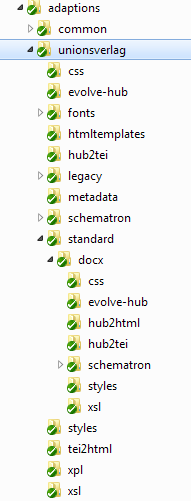
					input file name (docx, idml, …) as an XProc option.</p><p>In the file system, the cascaded configuration is stored like this:</p><div class="figure"><a id="d5e217"/><p class="title"><strong>Figure 1.1. Configuration directory layout for Unionsverlag</strong></p><div class="figure-contents"><div class="mediaobject"><img src="../../dirlayout.png" alt="Configuration directory layout for Unionsverlag"/></div></div></div><br class="figure-break"/><p>And this is the resulting parameter document:</p><pre class="programlisting"><span class="hl-directive" style="color: maroon">&lt;?xml version="1.0" encoding="UTF-8"?&gt;</span>
<strong class="hl-tag" style="color: #000096">&lt;c:param-set</strong> <span class="hl-attribute" style="color: #F5844C">xmlns:c</span>=<span class="hl-value" style="color: #993300">"http://www.w3.org/ns/xproc-step"</span><strong class="hl-tag" style="color: #000096">&gt;</strong>
   <strong class="hl-tag" style="color: #000096">&lt;c:param</strong> <span class="hl-attribute" style="color: #F5844C">name</span>=<span class="hl-value" style="color: #993300">"basename"</span> <span class="hl-attribute" style="color: #F5844C">value</span>=<span class="hl-value" style="color: #993300">"UV_STD_20655_00000_DOCX_TestBuch"</span><strong class="hl-tag" style="color: #000096">/&gt;</strong>
   <strong class="hl-tag" style="color: #000096">&lt;c:param</strong> <span class="hl-attribute" style="color: #F5844C">name</span>=<span class="hl-value" style="color: #993300">"debug"</span> <span class="hl-attribute" style="color: #F5844C">value</span>=<span class="hl-value" style="color: #993300">"'no'"</span><strong class="hl-tag" style="color: #000096">/&gt;</strong>
   <strong class="hl-tag" style="color: #000096">&lt;c:param</strong> <span class="hl-attribute" style="color: #F5844C">name</span>=<span class="hl-value" style="color: #993300">"debug-dir-uri"</span>
            <span class="hl-attribute" style="color: #F5844C">value</span>=<span class="hl-value" style="color: #993300">"file:/C:/cygwin/home/gerrit/Unionsverlag/transpect/debug"</span><strong class="hl-tag" style="color: #000096">/&gt;</strong>
   <strong class="hl-tag" style="color: #000096">&lt;c:param</strong> <span class="hl-attribute" style="color: #F5844C">name</span>=<span class="hl-value" style="color: #993300">"epub-version"</span> <span class="hl-attribute" style="color: #F5844C">value</span>=<span class="hl-value" style="color: #993300">"EPUB3"</span><strong class="hl-tag" style="color: #000096">/&gt;</strong>
   <strong class="hl-tag" style="color: #000096">&lt;c:param</strong> <span class="hl-attribute" style="color: #F5844C">name</span>=<span class="hl-value" style="color: #993300">"file"</span>
            <a id="co-params-file"/>❶value="file:/C:/cygwin/home/gerrit/Unionsverlag/content/unionsverlag/standard/20655/docx/UV_STD_20655_00000_DOCX_TestBuch.docx"/&gt;
   <strong class="hl-tag" style="color: #000096">&lt;c:param</strong> <span class="hl-attribute" style="color: #F5844C">name</span>=<span class="hl-value" style="color: #993300">"interface-language"</span> <span class="hl-attribute" style="color: #F5844C">value</span>=<span class="hl-value" style="color: #993300">"en"</span><strong class="hl-tag" style="color: #000096">/&gt;</strong>
   <strong class="hl-tag" style="color: #000096">&lt;c:param</strong> <span class="hl-attribute" style="color: #F5844C">name</span>=<span class="hl-value" style="color: #993300">"pipeline"</span> <span class="hl-attribute" style="color: #F5844C">value</span>=<span class="hl-value" style="color: #993300">"unknown"</span><strong class="hl-tag" style="color: #000096">/&gt;</strong>
   <strong class="hl-tag" style="color: #000096">&lt;c:param</strong> <span class="hl-attribute" style="color: #F5844C">name</span>=<span class="hl-value" style="color: #993300">"progress"</span> <span class="hl-attribute" style="color: #F5844C">value</span>=<span class="hl-value" style="color: #993300">"no"</span><strong class="hl-tag" style="color: #000096">/&gt;</strong>
   <strong class="hl-tag" style="color: #000096">&lt;c:param</strong> <span class="hl-attribute" style="color: #F5844C">name</span>=<span class="hl-value" style="color: #993300">"progress-to-stdout"</span> <span class="hl-attribute" style="color: #F5844C">value</span>=<span class="hl-value" style="color: #993300">"no"</span><strong class="hl-tag" style="color: #000096">/&gt;</strong>
   <strong class="hl-tag" style="color: #000096">&lt;c:param</strong> <span class="hl-attribute" style="color: #F5844C">name</span>=<span class="hl-value" style="color: #993300">"publisher-prefix-for-style-mapping"</span> <span class="hl-attribute" style="color: #F5844C">value</span>=<span class="hl-value" style="color: #993300">"uv"</span><strong class="hl-tag" style="color: #000096">/&gt;</strong>
   <strong class="hl-tag" style="color: #000096">&lt;c:param</strong> <span class="hl-attribute" style="color: #F5844C">name</span>=<span class="hl-value" style="color: #993300">"repo-href-canonical"</span>
            <a id="co-params-repo-href-canonical"/>❷value="http://unionsverlag.com/content-repo/unionsverlag/standard/20655/docx/UV_STD_20655_00000_DOCX_TestBuch.docx"/&gt;
   <strong class="hl-tag" style="color: #000096">&lt;c:param</strong> <span class="hl-attribute" style="color: #F5844C">name</span>=<span class="hl-value" style="color: #993300">"repo-href-local"</span>
            <span class="hl-attribute" style="color: #F5844C">value</span>=<span class="hl-value" style="color: #993300">"file:/C:/cygwin/home/gerrit/Unionsverlag/content/unionsverlag/standard/20655/docx/UV_STD_20655_00000_DOCX_TestBuch.docx"</span><strong class="hl-tag" style="color: #000096">/&gt;</strong>
   <strong class="hl-tag" style="color: #000096">&lt;c:param</strong> <span class="hl-attribute" style="color: #F5844C">name</span>=<span class="hl-value" style="color: #993300">"s9y1"</span> <span class="hl-attribute" style="color: #F5844C">value</span>=<span class="hl-value" style="color: #993300">"20655"</span><strong class="hl-tag" style="color: #000096">/&gt;</strong><a id="co-params-s9y1"/>❸
   <strong class="hl-tag" style="color: #000096">&lt;c:param</strong> <span class="hl-attribute" style="color: #F5844C">name</span>=<span class="hl-value" style="color: #993300">"s9y1-path"</span>
            <span class="hl-attribute" style="color: #F5844C">value</span>=<span class="hl-value" style="color: #993300">"file:/C:/cygwin/home/gerrit/Unionsverlag/content/unionsverlag/standard/20655/"</span><strong class="hl-tag" style="color: #000096">/&gt;</strong>
   <strong class="hl-tag" style="color: #000096">&lt;c:param</strong> <span class="hl-attribute" style="color: #F5844C">name</span>=<span class="hl-value" style="color: #993300">"s9y1-path-canonical"</span>
            <span class="hl-attribute" style="color: #F5844C">value</span>=<span class="hl-value" style="color: #993300">"http://unionsverlag.com/content-repo/unionsverlag/standard/20655/"</span><strong class="hl-tag" style="color: #000096">/&gt;</strong>
   <strong class="hl-tag" style="color: #000096">&lt;c:param</strong> <span class="hl-attribute" style="color: #F5844C">name</span>=<span class="hl-value" style="color: #993300">"s9y1-role"</span> <span class="hl-attribute" style="color: #F5844C">value</span>=<span class="hl-value" style="color: #993300">"work"</span><strong class="hl-tag" style="color: #000096">/&gt;</strong>
   <strong class="hl-tag" style="color: #000096">&lt;c:param</strong> <span class="hl-attribute" style="color: #F5844C">name</span>=<span class="hl-value" style="color: #993300">"s9y2"</span> <span class="hl-attribute" style="color: #F5844C">value</span>=<span class="hl-value" style="color: #993300">"docx"</span><strong class="hl-tag" style="color: #000096">/&gt;</strong>
   <strong class="hl-tag" style="color: #000096">&lt;c:param</strong> <span class="hl-attribute" style="color: #F5844C">name</span>=<span class="hl-value" style="color: #993300">"s9y2-path"</span>
            <span class="hl-attribute" style="color: #F5844C">value</span>=<span class="hl-value" style="color: #993300">"file:/C:/cygwin/home/gerrit/Unionsverlag/transpect/adaptions/unionsverlag/standard/docx/"</span><strong class="hl-tag" style="color: #000096">/&gt;</strong>
   <strong class="hl-tag" style="color: #000096">&lt;c:param</strong> <span class="hl-attribute" style="color: #F5844C">name</span>=<span class="hl-value" style="color: #993300">"s9y2-path-canonical"</span>
            <span class="hl-attribute" style="color: #F5844C">value</span>=<span class="hl-value" style="color: #993300">"http://customers.le-tex.de/generic/book-conversion/adaptions/unionsverlag/standard/docx/"</span><strong class="hl-tag" style="color: #000096">/&gt;</strong>
   <strong class="hl-tag" style="color: #000096">&lt;c:param</strong> <span class="hl-attribute" style="color: #F5844C">name</span>=<span class="hl-value" style="color: #993300">"s9y2-role"</span> <span class="hl-attribute" style="color: #F5844C">value</span>=<span class="hl-value" style="color: #993300">"ext"</span><strong class="hl-tag" style="color: #000096">/&gt;</strong>
   <strong class="hl-tag" style="color: #000096">&lt;c:param</strong> <span class="hl-attribute" style="color: #F5844C">name</span>=<span class="hl-value" style="color: #993300">"s9y3"</span> <span class="hl-attribute" style="color: #F5844C">value</span>=<span class="hl-value" style="color: #993300">"standard"</span><strong class="hl-tag" style="color: #000096">/&gt;</strong>
   <strong class="hl-tag" style="color: #000096">&lt;c:param</strong> <span class="hl-attribute" style="color: #F5844C">name</span>=<span class="hl-value" style="color: #993300">"s9y3-path"</span>
            <span class="hl-attribute" style="color: #F5844C">value</span>=<span class="hl-value" style="color: #993300">"file:/C:/cygwin/home/gerrit/Unionsverlag/transpect/adaptions/unionsverlag/standard/"</span><strong class="hl-tag" style="color: #000096">/&gt;</strong>
   <strong class="hl-tag" style="color: #000096">&lt;c:param</strong> <span class="hl-attribute" style="color: #F5844C">name</span>=<span class="hl-value" style="color: #993300">"s9y3-path-canonical"</span>
            <span class="hl-attribute" style="color: #F5844C">value</span>=<span class="hl-value" style="color: #993300">"http://customers.le-tex.de/generic/book-conversion/adaptions/unionsverlag/standard/"</span><strong class="hl-tag" style="color: #000096">/&gt;</strong>
   <strong class="hl-tag" style="color: #000096">&lt;c:param</strong> <span class="hl-attribute" style="color: #F5844C">name</span>=<span class="hl-value" style="color: #993300">"s9y3-role"</span> <span class="hl-attribute" style="color: #F5844C">value</span>=<span class="hl-value" style="color: #993300">"production-line"</span><strong class="hl-tag" style="color: #000096">/&gt;</strong>
   <strong class="hl-tag" style="color: #000096">&lt;c:param</strong> <span class="hl-attribute" style="color: #F5844C">name</span>=<span class="hl-value" style="color: #993300">"s9y4"</span> <span class="hl-attribute" style="color: #F5844C">value</span>=<span class="hl-value" style="color: #993300">"unionsverlag"</span><strong class="hl-tag" style="color: #000096">/&gt;</strong>
   <strong class="hl-tag" style="color: #000096">&lt;c:param</strong> <span class="hl-attribute" style="color: #F5844C">name</span>=<span class="hl-value" style="color: #993300">"s9y4-path"</span>
            <span class="hl-attribute" style="color: #F5844C">value</span>=<span class="hl-value" style="color: #993300">"file:/C:/cygwin/home/gerrit/Unionsverlag/transpect/adaptions/unionsverlag/"</span><strong class="hl-tag" style="color: #000096">/&gt;</strong>
   <strong class="hl-tag" style="color: #000096">&lt;c:param</strong> <span class="hl-attribute" style="color: #F5844C">name</span>=<span class="hl-value" style="color: #993300">"s9y4-path-canonical"</span>
            <span class="hl-attribute" style="color: #F5844C">value</span>=<span class="hl-value" style="color: #993300">"http://customers.le-tex.de/generic/book-conversion/adaptions/unionsverlag/"</span><strong class="hl-tag" style="color: #000096">/&gt;</strong>
   <strong class="hl-tag" style="color: #000096">&lt;c:param</strong> <span class="hl-attribute" style="color: #F5844C">name</span>=<span class="hl-value" style="color: #993300">"s9y4-role"</span> <span class="hl-attribute" style="color: #F5844C">value</span>=<span class="hl-value" style="color: #993300">"publisher"</span><strong class="hl-tag" style="color: #000096">/&gt;</strong>
   <strong class="hl-tag" style="color: #000096">&lt;c:param</strong> <span class="hl-attribute" style="color: #F5844C">name</span>=<span class="hl-value" style="color: #993300">"s9y5-path"</span>
            <span class="hl-attribute" style="color: #F5844C">value</span>=<span class="hl-value" style="color: #993300">"file:/C:/cygwin/home/gerrit/Unionsverlag/transpect/adaptions/common/"</span><strong class="hl-tag" style="color: #000096">/&gt;</strong>
   <strong class="hl-tag" style="color: #000096">&lt;c:param</strong> <span class="hl-attribute" style="color: #F5844C">name</span>=<span class="hl-value" style="color: #993300">"s9y5-path-canonical"</span>
            <span class="hl-attribute" style="color: #F5844C">value</span>=<span class="hl-value" style="color: #993300">"http://customers.le-tex.de/generic/book-conversion/adaptions/common/"</span><strong class="hl-tag" style="color: #000096">/&gt;</strong>
   <strong class="hl-tag" style="color: #000096">&lt;c:param</strong> <span class="hl-attribute" style="color: #F5844C">name</span>=<span class="hl-value" style="color: #993300">"s9y5-role"</span> <span class="hl-attribute" style="color: #F5844C">value</span>=<span class="hl-value" style="color: #993300">"common"</span><strong class="hl-tag" style="color: #000096">/&gt;</strong>
   <strong class="hl-tag" style="color: #000096">&lt;c:param</strong> <span class="hl-attribute" style="color: #F5844C">name</span>=<span class="hl-value" style="color: #993300">"srcpaths"</span> <span class="hl-attribute" style="color: #F5844C">value</span>=<span class="hl-value" style="color: #993300">"yes"</span><strong class="hl-tag" style="color: #000096">/&gt;</strong>
   <strong class="hl-tag" style="color: #000096">&lt;c:param</strong> <span class="hl-attribute" style="color: #F5844C">name</span>=<span class="hl-value" style="color: #993300">"transpect-project-uri"</span> <span class="hl-attribute" style="color: #F5844C">value</span>=<span class="hl-value" style="color: #993300">""</span><strong class="hl-tag" style="color: #000096">/&gt;</strong>
   <strong class="hl-tag" style="color: #000096">&lt;c:param</strong> <span class="hl-attribute" style="color: #F5844C">name</span>=<span class="hl-value" style="color: #993300">"use-css-decorator-classes"</span> <span class="hl-attribute" style="color: #F5844C">value</span>=<span class="hl-value" style="color: #993300">"yes"</span><strong class="hl-tag" style="color: #000096">/&gt;</strong>
   <strong class="hl-tag" style="color: #000096">&lt;c:param</strong> <span class="hl-attribute" style="color: #F5844C">name</span>=<span class="hl-value" style="color: #993300">"which-htmlreport"</span> <span class="hl-attribute" style="color: #F5844C">value</span>=<span class="hl-value" style="color: #993300">"evolve-hub"</span><strong class="hl-tag" style="color: #000096">/&gt;</strong>
<strong class="hl-tag" style="color: #000096">&lt;/c:param-set&gt;</strong></pre><div class="calloutlist"><table border="0" summary="Callout list"><tr><td width="5%" valign="top" align="left"><p><a href="#co-params-file">❶</a> </p></td><td valign="top" align="left"><p>The input file URI. It coincides with the calculated <code class="literal">repo-href-local</code> parameter because it was uploaded from its location in the locally checked-out
						content repository.</p></td></tr><tr><td width="5%" valign="top" align="left"><p><a href="#co-params-repo-href-canonical">❷</a> </p></td><td valign="top" align="left"><p>This is the calculated canonical content repository URL of the uploaded file. It is currently not used for any specific purpose, but who knows what it’ll be good for.</p></td></tr><tr><td width="5%" valign="top" align="left"><p><a href="#co-params-s9y1">❸</a> </p></td><td valign="top" align="left"><p>Now the interesting part begins. While previously <a class="link" href="https://subversion.le-tex.de/common/pubcoach/trunk/xpl/load-cascaded.xpl" target="_top">transpect:load-cascaded</a> and its implementing <a class="link" href="https://subversion.le-tex.de/common/pubcoach/trunk/xsl/load-cascaded.xsl" target="_top">XSLT</a> relied on a
							sequence of parameters called 'work-path', 'series-path', 'publisher-path', and 'common-path' (in descending
							specificity), these parameters are now called 's9y1-path', 's9y2-path', and so on, where 's9y' stands for
							“specificity”. (In contrast to “adaptations”, which we abbreviated by the much rarer “adaptions,” we kept the
							fully spelled-out word specificity, except that we didn’t spell it out due to its length and complexity. Maybe in
							a future revision we should replace “adaptions” with “adaptations,” abbreviated as 'a9s'…) There are additional
							parameters now so that one knows which role (publisher, work, …), name (unionsverlag, 20655, …) and canonical
							paths are associated with a given specificity. Except for the least specific item: There is a parameter
							's9y5-role' with the value 'common', and also 's9y5-path' and 's9y5-path-canonical', but no parameter 's9y5' as
							for the more specific items. It should be clear that the number 5 in 's9y5-…' is not fixed. If another content
							item is determined to belong to a different clade, the total number of configuration levels could be different.
							For example, if a TEI XML file 'UV_STD_20655_00000_DOCX_TestBuch.xml' had been uploaded, the matching clade would
							have been the parent clade (<code class="literal">production-line=standard</code>), reducing the total number of levels to
							4, that is, <code class="literal">s9y4-role=common</code>. Currently, the maximum nesting depth is 9.</p></td></tr></table></div><p>This parameter document will be passed to all of transpect’s XProc steps that rely on cascaded configuration (and
					to some other steps, too – there are some more global settings apart from the cascade handily stowed away in that
					document), particularly to <a class="link" href="https://subversion.le-tex.de/common/pubcoach/trunk/xpl/load-cascaded.xpl" target="_top">transpect:load-cascaded</a> itself.</p><div class="sidebar"><div class="titlepage"><div><div><p class="title"><strong>Alternative Clade Model</strong></p></div></div></div><p>It is absolutely possible to nest a clade of one role into another clade of the same role. Unionsverlag
          could have modeled its clades like this:</p><pre class="programlisting">      <strong class="hl-tag" style="color: #000096">&lt;clade</strong> <span class="hl-attribute" style="color: #F5844C">role</span>=<span class="hl-value" style="color: #993300">"production-line"</span> <span class="hl-attribute" style="color: #F5844C">name</span>=<span class="hl-value" style="color: #993300">"standard"</span><strong class="hl-tag" style="color: #000096">&gt;</strong>
        <strong class="hl-tag" style="color: #000096">&lt;content</strong> <span class="hl-attribute" style="color: #F5844C">role</span>=<span class="hl-value" style="color: #993300">"work"</span> <span class="hl-attribute" style="color: #F5844C">name-regex</span>=<span class="hl-value" style="color: #993300">"^\d{5}"</span><strong class="hl-tag" style="color: #000096">/&gt;</strong>
        <strong class="hl-tag" style="color: #000096">&lt;clade</strong> <span class="hl-attribute" style="color: #F5844C">role</span>=<span class="hl-value" style="color: #993300">"production-line"</span> <span class="hl-attribute" style="color: #F5844C">name</span>=<span class="hl-value" style="color: #993300">"idml"</span> 
          <span class="hl-attribute" style="color: #F5844C">content-base-uri</span>=<span class="hl-value" style="color: #993300">".."</span><strong class="hl-tag" style="color: #000096">&gt;</strong>
          <strong class="hl-tag" style="color: #000096">&lt;content</strong> <span class="hl-attribute" style="color: #F5844C">role</span>=<span class="hl-value" style="color: #993300">"work"</span> <span class="hl-attribute" style="color: #F5844C">name-regex</span>=<span class="hl-value" style="color: #993300">"^\d{5}"</span><strong class="hl-tag" style="color: #000096">/&gt;</strong>
        <strong class="hl-tag" style="color: #000096">&lt;/clade&gt;</strong>
        <strong class="hl-tag" style="color: #000096">&lt;clade</strong> <span class="hl-attribute" style="color: #F5844C">role</span>=<span class="hl-value" style="color: #993300">"production-line"</span> <span class="hl-attribute" style="color: #F5844C">name</span>=<span class="hl-value" style="color: #993300">"docx"</span> 
        	<span class="hl-attribute" style="color: #F5844C">content-base-uri</span>=<span class="hl-value" style="color: #993300">".."</span><strong class="hl-tag" style="color: #000096">&gt;</strong>
          <strong class="hl-tag" style="color: #000096">&lt;content</strong> <span class="hl-attribute" style="color: #F5844C">role</span>=<span class="hl-value" style="color: #993300">"work"</span> <span class="hl-attribute" style="color: #F5844C">name-regex</span>=<span class="hl-value" style="color: #993300">"^\d{5}"</span><strong class="hl-tag" style="color: #000096">/&gt;</strong>
        <strong class="hl-tag" style="color: #000096">&lt;/clade&gt;</strong>
      <strong class="hl-tag" style="color: #000096">&lt;/clade&gt;</strong></pre><p>A drawback with this appoach is that you can only have one of each production lines <code class="literal">docx</code> and <code class="literal">idml</code> 
          throughout your project. Otherwise selection by <code class="literal">production-line</code> would be ambiguous. In addition, it puts more burden
          on <code class="literal">transpect:parse-file-name()</code> because it needs to include a case switch, based on what is parsed as <code class="literal">@ext</code>,
          in order to calculate <code class="literal">@production-line</code>.</p></div><p>To wrap it up: The XProc parameter contains the paths where transpect will look for configuration overrides. The
					parameter document will be computed anew for each XProc run. It will be computed, by means of a customizable XSLT, from
					the transpect project’s configuration file. The input file name and optionally a clades selection string will serve as
					parameters to that transformation. The configuration file specifies how content is organized into “clades” and where the content resides,
					both as local and as canonical repository URIs.</p></div></div><div class="footnotes"><br/><hr style="width:100; text-align:left;margin-left: 0"/><div id="ftn.d5e62" class="footnote"><p><a href="#d5e62" class="para"><sup class="para">[1] </sup></a>Tagging in the sense of keywords that form “tag clouds”, not in the sense of XML tagging.</p></div></div></div><div class="chapter"><div class="titlepage"><div><div><h1 class="title"><a id="system"/>Chapter 2. System requirements</h1></div></div></div><p>Minimum system requirements: </p><div xmlns="" xmlns:d="http://docbook.org/ns/docbook" xmlns:svg="http://www.w3.org/2000/svg" class="itemizedlist"><ul class="itemizedlist" style=""><li xmlns="http://www.w3.org/1999/xhtml" class="listitem"><p>SVN 1.5 or higher</p></li><li xmlns="http://www.w3.org/1999/xhtml" class="listitem"><p>Java 1.6</p></li></ul></div><p>Optional system requirements: </p><div xmlns="" xmlns:d="http://docbook.org/ns/docbook" xmlns:svg="http://www.w3.org/2000/svg" class="itemizedlist"><ul class="itemizedlist" style=""><li xmlns="http://www.w3.org/1999/xhtml" class="listitem"><p>GNU MAKE 3.81 or higher</p></li><li xmlns="http://www.w3.org/1999/xhtml" class="listitem"><p>Bash</p></li></ul></div></div><div class="chapter"><div class="titlepage"><div><div><h1 class="title"><a id="setup"/>Chapter 3. Setting up a transpect project</h1></div></div></div><div class="note" style="margin-left: 0.5in; margin-right: 0.5in;"><h3 class="title">Note</h3><p>The remainder of this manual has not yet been updated to reflect the clade-based configuration mechanism described in <a class="xref" href="#sec-cascade" title="The Configuration Cascade: Content in Clades">the section called “The Configuration Cascade: Content in Clades”</a>!</p></div><p>This chapter describes the general setting up of a transpect project. You can find examples in Chapter <a class="xref" href="#examples" title="Chapter 4. Examples">Chapter 4, <em>Examples</em></a></p><p>A transpect project can consist of different sub-projects for, e.g., imprints, series etc. or other sub-projects which
      contain to one project. For example, the demo project contains several sub-projects for different conversions (see Chapter
        <a class="xref" href="#examples" title="Chapter 4. Examples">Chapter 4, <em>Examples</em></a>).</p><p>Components of a transpect project: </p><div xmlns="" xmlns:d="http://docbook.org/ns/docbook" xmlns:svg="http://www.w3.org/2000/svg" class="itemizedlist"><ul class="itemizedlist" style=""><li xmlns="http://www.w3.org/1999/xhtml" class="listitem"><p>SVN code repository (generally called <code class="filename">trunk</code>)</p></li><li xmlns="http://www.w3.org/1999/xhtml" class="listitem"><p>SVN content repository (generally called <code class="filename">content</code>)</p></li><li xmlns="http://www.w3.org/1999/xhtml" class="listitem"><p>SVN externals for the transpect modules (one of the modules is <code class="filename">calabash</code>)</p></li><li xmlns="http://www.w3.org/1999/xhtml" class="listitem"><p>XML catalogs</p></li><li xmlns="http://www.w3.org/1999/xhtml" class="listitem"><p>Configuration file</p></li><li xmlns="http://www.w3.org/1999/xhtml" class="listitem"><p>Directory <code class="filename">adaptions</code> for project-specific adaptations (XSLT, XProc,
            Schematron, CSS, …)</p></li><li xmlns="http://www.w3.org/1999/xhtml" class="listitem"><p><code class="filename">Makefile</code> (optional)</p></li><li xmlns="http://www.w3.org/1999/xhtml" class="listitem"><p>One or more front-end XProc pipelines, typically located in the directory <code class="filename">adaptions/common/xpl</code></p></li></ul></div><div class="task"><p class="title"><strong>Step-by-step setup guide</strong></p><div class="procedure"><ol class="procedure" type="1"><li class="step"><p class="title"><strong>Creating SVN repositories</strong></p><ol type="a" class="substeps"><li class="step"><p class="title"><strong>Creating an SVN code repository</strong></p><div class="orderedlist"><ol class="orderedlist" type="1"><li class="listitem"><p>Create an SVN code repository.</p></li><li class="listitem"><p>Check out the SVN code repository.
                    </p><pre class="screen">svn co web_address_of_the_code_repository name_of_the_code_directory</pre><p> e.g.
                    </p><pre class="screen">svn co https://subversion.le-tex.de/common/transpect-demo/trunk/ transpect-demo/trunk</pre></li></ol></div></li><li class="step"><p class="title"><strong>Creating an SVN content repository (if none is existing)</strong></p><div class="orderedlist"><ol class="orderedlist" type="1"><li class="listitem"><p>Create an SVN content repository.</p></li><li class="listitem"><p>Check out the SVN content repository.
                    </p><pre class="screen">svn co web_address_of_the_content_repository name_of_the_content_directory</pre><p> e.g.
                    </p><pre class="screen">svn co https://subversion.le-tex.de/common/transpect-demo/content/ transpect-demo/content</pre></li></ol></div><p>Generally, the SVN code repository and the SVN content repository are located in the same directory. But,
                the SVN content repository can be located in a different directory. Then, you have to consider Step <a class="xref" href="#step_cr" title="Configurating the SVN content repository location">Step 7</a>.</p></li></ol></li><li class="step"><p class="title"><strong>Creating an oXygen project file (if you use oXygen as editor)</strong></p><p>It isn't necessary to create an oXygen project file but an oXygen project file simplifies the working with the
            files of the demo project.</p><div class="orderedlist"><ol class="orderedlist" type="1"><li class="listitem"><p>Create an oXygen project file in the oXygen editor.</p></li><li class="listitem"><p>Add it to the SVN code repository (<code class="filename">trunk</code>).
                </p><pre class="screen">svn add projectname.xpr</pre></li><li class="listitem"><p>Commit.</p></li></ol></div></li><li class="step"><a id="step_externals"/><p class="title"><strong>Including the SVN externals</strong></p><p>The needed SVN externals depend on the transpect project and the conversion pipelines.</p><p>calabash (<a class="link" href="https://subversion.le-tex.de/common/calabash/" target="_top">https://subversion.le-tex.de/common/calabash/</a>) must be included in any case.</p><p>The examples in Chapter <a class="xref" href="#examples" title="Chapter 4. Examples">Chapter 4, <em>Examples</em></a> show the needed SVN externals for some selected
            conversions.</p><div class="orderedlist"><ol class="orderedlist" type="1"><li class="listitem"><p>Open an editor in the SVN code repository (<code class="filename">trunk</code>):
                </p><pre class="screen">export EDITOR=name_of_the_editor &amp;&amp; svn pe svn:externals .</pre><p> e.g. </p><pre class="screen">export EDITOR=emacs &amp;&amp; svn pe svn:externals .</pre><p>
                <span class="italic">A temporary file will be opened in the choosen editor.</span></p></li><li class="listitem"><p>Edit the file and include the needed SVN externals.</p></li><li class="listitem"><p>Save the file.</p></li><li class="listitem"><p>Update the SVN code repository.</p></li><li class="listitem"><p>Commit the SVN externals.</p><p><span class="italic">The externals will be fetched and are available in the SVN code
                  repository.</span></p></li></ol></div></li><li class="step"><p class="title"><strong>Configurating <code class="filename">.subversion</code></strong></p><p>In more recent versions of SVN, XML files are treated as binary data. But so, it isn't possible to view
            different versions of a file with the command <span class="command"><strong>svn diff</strong></span>. For using it, the XML have to be treated
            as text. If you might want to change this, then you have to edit your subversion settings
              (<code class="filename">~/.subversion/config</code> on Unix-like systems). Then, new XML files will be stored as mime-type
              <code class="code">text/xml</code>.</p><div class="orderedlist"><ol class="orderedlist" type="1"><li class="listitem"><p>Add the following lines to the file <code class="filename">~/.subversion/config</code>
                  </p><pre class="programlisting">Makefile = svn:eol-style=LF
*.xml = svn:mime-type=text/xml;svn:eol-style=LF
*.xsl = svn:mime-type=text/xml;svn:eol-style=LF
*.xpl = svn:mime-type=text/xml;svn:eol-style=LF
*.xpr = svn:mime-type=text/xml;svn:eol-style=LF
*.rng = svn:mime-type=text/xml;svn:eol-style=LF
*.rnc = svn:mime-type=text/plain;svn:eol-style=LF
*.css = svn:mime-type=text/css;svn:eol-style=LF</pre></li><li class="listitem"><p>Commit.</p></li></ol></div></li><li class="step"><a id="step-catalog"/><p class="title"><strong>Creating the central XML catalog</strong></p><div class="orderedlist"><ol class="orderedlist" type="1"><li class="listitem"><p>Create a central XML catalog in the same directory as the calabash external (generally, this is the SVN code
                repository). The central XML catalog must be named <code class="filename">xmlcatalog/catalog.xml</code>.</p><p>The central XML catalog has the following structure:
                </p><pre class="programlisting"><strong class="hl-tag" style="color: #000096">&lt;catalog</strong> <span class="hl-attribute" style="color: #F5844C">xmlns</span>=<span class="hl-value" style="color: #993300">"urn:oasis:names:tc:entity:xmlns:xml:catalog"</span><strong class="hl-tag" style="color: #000096">&gt;</strong>
            
  <strong class="hl-tag" style="color: #000096">&lt;rewriteURI</strong> <span class="hl-attribute" style="color: #F5844C">uriStartString</span>=<span class="hl-value" style="color: #993300">"..."</span> <span class="hl-attribute" style="color: #F5844C">rewritePrefix</span>=<span class="hl-value" style="color: #993300">"..."</span><strong class="hl-tag" style="color: #000096">/&gt;</strong>
  
  <strong class="hl-tag" style="color: #000096">&lt;nextCatalog</strong> <span class="hl-attribute" style="color: #F5844C">catalog</span>=<span class="hl-value" style="color: #993300">"..."</span><strong class="hl-tag" style="color: #000096">/&gt;</strong>
  <strong class="hl-tag" style="color: #000096">&lt;nextCatalog</strong> <span class="hl-attribute" style="color: #F5844C">catalog</span>=<span class="hl-value" style="color: #993300">"..."</span><strong class="hl-tag" style="color: #000096">/&gt;</strong>
  <strong class="hl-tag" style="color: #000096">&lt;nextCatalog</strong> <span class="hl-attribute" style="color: #F5844C">catalog</span>=<span class="hl-value" style="color: #993300">"..."</span><strong class="hl-tag" style="color: #000096">/&gt;</strong>
  ...
  
<strong class="hl-tag" style="color: #000096">&lt;/catalog&gt;</strong></pre></li><li class="listitem"><p>Include the element <code class="code">rewriteURI</code> with the attributes <code class="code">uriStartString</code> and
                  <code class="code">rewritePrefix</code>,
                e.g.</p><pre class="programlisting">&lt;rewriteURI uriStartString="http://customers.le-tex.de/generic/book-conversion/" rewritePrefix="../"/&gt;</pre></li><li class="listitem"><p>Include the XML catalogs via <code class="code">nextCatalog</code>.</p><p>The needed XML catalogs depend on the included SVN externals. Generally, you have to include one entry per
                SVN external. The SVN external <code class="filename">calabash</code> doesn't need an entry in the central catalog
                file.</p><p>The examples in Chapter <a class="xref" href="#examples" title="Chapter 4. Examples">Chapter 4, <em>Examples</em></a> show the needed XML catalogs for some selected
                conversions.</p></li></ol></div></li><li class="step"><a id="step_conf-file"/><p class="title"><strong>Setting up a configuration file</strong></p><p>The configuration file contains information about</p><div xmlns="" xmlns:d="http://docbook.org/ns/docbook" xmlns:svg="http://www.w3.org/2000/svg" class="itemizedlist"><ul class="itemizedlist" style=""><li xmlns="http://www.w3.org/1999/xhtml" class="listitem"><p>publisher name</p></li><li xmlns="http://www.w3.org/1999/xhtml" class="listitem"><p>bookseries (optional)</p></li><li xmlns="http://www.w3.org/1999/xhtml" class="listitem"><p>DOI prefix (optional)</p></li><li xmlns="http://www.w3.org/1999/xhtml" class="listitem"><p>path name mappings (optional)</p></li></ul></div><p>While it is necessary to specify a config file, most of the settings there could probably be specified by
            providing a different paths XSLT (see <a class="xref" href="#step_paths" title="Customizing the path synthesis XSLT">Step 11</a>). We might eventually drop config files. If we
            don’t, we’ll document its use and provide a schema.</p><p>Example for a minimum configuration file:
            </p><pre class="screen">&lt;publisher-conf content-base-uri="http://www.le-tex.de/transpect-demo/content/"&gt;
  &lt;publishers&gt;
    &lt;publisher xml:id="letex" name="le-tex" doi-prefix="xxxx" file-name-component="" filesystem-path-component="letex"/&gt;
  &lt;/publishers&gt;
&lt;/publisher-conf&gt;</pre><div class="orderedlist"><ol class="orderedlist" type="1"><li class="listitem"><p>Create a file <code class="filename">conf/conf.xml</code>. </p></li><li class="listitem"><p>Add the root element <code class="code">publisher-conf</code> with the attribute <code class="code">content-base-uri</code>. </p><pre class="screen">&lt;publisher-conf content-base-uri="content_base_uri"&gt;</pre><p> e.g.
                </p><pre class="screen">&lt;publisher-conf content-base-uri="http://www.le-tex.de/transpect-demo/content/"&gt;</pre></li><li class="listitem"><p>Add an element <code class="code">publishers</code> with one or elements <code class="code">publisher</code>, e.g. </p><pre class="screen">&lt;publishers&gt;
  &lt;publisher xml:id="letex" name="le-tex" doi-prefix="xxxx" file-name-component="" filesystem-path-component="letex"/&gt;
&lt;/publishers&gt;</pre><p>
                </p></li></ol></div><p>If we talk about the <span class="emphasis"><em>configuration cascade</em></span>, we are not referring to this config file. The
            cascade refers to the override files that may be specified for imprints, series, etc.</p></li><li class="step"><a id="step_cr"/><p class="title"><strong>Configurating the SVN content repository location</strong></p><p>Generally, the SVN code repository and the SVN content repository are located in the same directory. But, the
            SVN content repository can be located in a different directory. Then, you have to add an additional catalog file
            which contains the path to the location of the SVN content repository.</p><p>When you are located in the SVN code repository, it is searched for the SVN content repository in the following
            order: </p><div class="orderedlist"><ol class="orderedlist" type="1"><li class="listitem"><p><code class="filename">xmlcatalog/content-repo.catalog.xml</code>.</p></li><li class="listitem"><p><code class="filename">xmlcatalog/content-repo.default.catalog.xml</code></p></li><li class="listitem"><p><code class="filename">../content/</code></p></li></ol></div><p> If there isn't a file <code class="filename">xmlcatalog/content-repo.catalog.xml</code>, it will be looked for
            a file <code class="filename">xmlcatalog/content-repo.default.catalog.xml</code>. If there isn't such a file, then the SVN
            content repository is expected in the folder <code class="filename">../content</code>.</p><p>If the SVN content repository isn't located in the same directory as the SVN code repository:</p><div class="orderedlist"><ol class="orderedlist" type="1"><li class="listitem"><p>Create an catalog file in the SVN code repository.</p></li><li class="listitem"><p>Save the catalog file under the name </p><div xmlns="" xmlns:d="http://docbook.org/ns/docbook" xmlns:svg="http://www.w3.org/2000/svg" class="itemizedlist"><ul class="itemizedlist" style=""><li xmlns="http://www.w3.org/1999/xhtml" class="listitem"><p><code class="filename">xmlcatalog/content-repo.catalog.xml</code> (unversioned)</p></li></ul></div><p> or </p><div xmlns="" xmlns:d="http://docbook.org/ns/docbook" xmlns:svg="http://www.w3.org/2000/svg" class="itemizedlist"><ul class="itemizedlist" style=""><li xmlns="http://www.w3.org/1999/xhtml" class="listitem"><p><code class="filename">xmlcatalog/content-repo.default.catalog.xml</code> (versioned)</p></li></ul></div></li><li class="listitem"><p>Add the file <code class="filename">xmlcatalog/content-repo.default.catalog.xml</code> to the SVN code repository.
                So, it will be versioned.</p></li><li class="listitem"><p>Edit the catalog file (<code class="filename">xmlcatalog/content-repo.catalog.xml</code> or
                  <code class="filename">xmlcatalog/content-repo.default.catalog.xml</code> ) by adding the <code class="code">content-base-uri</code>
                and the location of the SVN content repository. 
                </p><pre class="programlisting"><strong class="hl-tag" style="color: #000096">&lt;catalog</strong> <span class="hl-attribute" style="color: #F5844C">xmlns</span>=<span class="hl-value" style="color: #993300">"urn:oasis:names:tc:entity:xmlns:xml:catalog"</span><strong class="hl-tag" style="color: #000096">&gt;</strong>
                
  <strong class="hl-tag" style="color: #000096">&lt;rewriteURI</strong> <span class="hl-attribute" style="color: #F5844C">uriStartString</span>=<span class="hl-value" style="color: #993300">"content-base-uri"</span> <span class="hl-attribute" style="color: #F5844C">rewritePrefix</span>=<span class="hl-value" style="color: #993300">"location_of_the_SVN_content_repository"</span><strong class="hl-tag" style="color: #000096">/&gt;</strong>
  
<strong class="hl-tag" style="color: #000096">&lt;/catalog&gt;</strong></pre><p>
                e.g. </p><div xmlns="" xmlns:d="http://docbook.org/ns/docbook" xmlns:svg="http://www.w3.org/2000/svg" class="itemizedlist"><ul class="itemizedlist" style=""><li xmlns="http://www.w3.org/1999/xhtml" class="listitem"><p>absolute path to the SVN content
                      repository</p><pre class="programlisting"><strong class="hl-tag" style="color: #000096">&lt;catalog</strong> <span class="hl-attribute" style="color: #F5844C">xmlns</span>=<span class="hl-value" style="color: #993300">"urn:oasis:names:tc:entity:xmlns:xml:catalog"</span><strong class="hl-tag" style="color: #000096">&gt;</strong>
                  
  <strong class="hl-tag" style="color: #000096">&lt;rewriteURI</strong> <span class="hl-attribute" style="color: #F5844C">uriStartString</span>=<span class="hl-value" style="color: #993300">"http://cms.acme.com/content/"</span> <span class="hl-attribute" style="color: #F5844C">rewritePrefix</span>=<span class="hl-value" style="color: #993300">"file:///c:/cygwin/home/gerrit/ACME/content/"</span><strong class="hl-tag" style="color: #000096">/&gt;</strong>
  
<strong class="hl-tag" style="color: #000096">&lt;/catalog&gt;</strong></pre></li><li xmlns="http://www.w3.org/1999/xhtml" class="listitem"><p>relative path to the SVN content
                      repository</p><pre class="programlisting"><strong class="hl-tag" style="color: #000096">&lt;catalog</strong> <span class="hl-attribute" style="color: #F5844C">xmlns</span>=<span class="hl-value" style="color: #993300">"urn:oasis:names:tc:entity:xmlns:xml:catalog"</span><strong class="hl-tag" style="color: #000096">&gt;</strong>
                  
  <strong class="hl-tag" style="color: #000096">&lt;rewriteURI</strong> <span class="hl-attribute" style="color: #F5844C">uriStartString</span>=<span class="hl-value" style="color: #993300">"http://www.le-tex.de/transpect-demo/content/"</span> <span class="hl-attribute" style="color: #F5844C">rewritePrefix</span>=<span class="hl-value" style="color: #993300">"../../content/"</span><strong class="hl-tag" style="color: #000096">/&gt;</strong> 
  
<strong class="hl-tag" style="color: #000096">&lt;/catalog&gt;</strong></pre></li></ul></div></li><li class="listitem"><p>Add the catalog file to the central XML catalog <code class="filename">xmlcatalog/xmlcatalog.xml</code>
                </p><div xmlns="" xmlns:d="http://docbook.org/ns/docbook" xmlns:svg="http://www.w3.org/2000/svg" class="itemizedlist"><ul class="itemizedlist" style=""><li xmlns="http://www.w3.org/1999/xhtml" class="listitem"><p>If the catalog file is unversioned (<code class="filename">xmlcatalog/content-repo.catalog.xml</code>):</p><p>Add the line </p><pre class="programlisting">&lt;nextCatalog catalog="content-repo.catalog.xml"/&gt;</pre><p>
                      e.g.
                      </p><pre class="programlisting"><strong class="hl-tag" style="color: #000096">&lt;catalog</strong> <span class="hl-attribute" style="color: #F5844C">xmlns</span>=<span class="hl-value" style="color: #993300">"urn:oasis:names:tc:entity:xmlns:xml:catalog"</span><strong class="hl-tag" style="color: #000096">&gt;</strong>
            
  <strong class="hl-tag" style="color: #000096">&lt;rewriteURI</strong> <span class="hl-attribute" style="color: #F5844C">uriStartString</span>=<span class="hl-value" style="color: #993300">"http://customers.le-tex.de/generic/book-conversion/"</span> <span class="hl-attribute" style="color: #F5844C">rewritePrefix</span>=<span class="hl-value" style="color: #993300">"../"</span><strong class="hl-tag" style="color: #000096">/&gt;</strong>
  
  <strong class="hl-tag" style="color: #000096">&lt;nextCatalog</strong> <span class="hl-attribute" style="color: #F5844C">catalog</span>=<span class="hl-value" style="color: #993300">""</span><strong class="hl-tag" style="color: #000096">/&gt;</strong>
  <strong class="hl-tag" style="color: #000096">&lt;nextCatalog</strong> <span class="hl-attribute" style="color: #F5844C">catalog</span>=<span class="hl-value" style="color: #993300">""</span><strong class="hl-tag" style="color: #000096">/&gt;</strong>
  <strong class="hl-tag" style="color: #000096">&lt;nextCatalog</strong> <span class="hl-attribute" style="color: #F5844C">catalog</span>=<span class="hl-value" style="color: #993300">""</span><strong class="hl-tag" style="color: #000096">/&gt;</strong>
  ...
 
  <strong class="hl-tag" style="color: #000096">&lt;nextCatalog</strong> <span class="hl-attribute" style="color: #F5844C">catalog</span>=<span class="hl-value" style="color: #993300">"content-repo.catalog.xml"</span><strong class="hl-tag" style="color: #000096">/&gt;</strong>
  
<strong class="hl-tag" style="color: #000096">&lt;/catalog&gt;</strong></pre></li><li xmlns="http://www.w3.org/1999/xhtml" class="listitem"><p>If the catalog file is versioned
                      (<code class="filename">xmlcatalog/content-repo.default.catalog.xml</code>):</p><p>Add the line
                      </p><pre class="programlisting">&lt;nextCatalog catalog="content-repo.default.catalog.xml"/&gt;</pre><p> e.g.
                      </p><pre class="programlisting"><strong class="hl-tag" style="color: #000096">&lt;catalog</strong> <span class="hl-attribute" style="color: #F5844C">xmlns</span>=<span class="hl-value" style="color: #993300">"urn:oasis:names:tc:entity:xmlns:xml:catalog"</span><strong class="hl-tag" style="color: #000096">&gt;</strong>
            
  <strong class="hl-tag" style="color: #000096">&lt;rewriteURI</strong> <span class="hl-attribute" style="color: #F5844C">uriStartString</span>=<span class="hl-value" style="color: #993300">"http://customers.le-tex.de/generic/book-conversion/"</span> <span class="hl-attribute" style="color: #F5844C">rewritePrefix</span>=<span class="hl-value" style="color: #993300">"../"</span><strong class="hl-tag" style="color: #000096">/&gt;</strong>
  
  <strong class="hl-tag" style="color: #000096">&lt;nextCatalog</strong> <span class="hl-attribute" style="color: #F5844C">catalog</span>=<span class="hl-value" style="color: #993300">""</span><strong class="hl-tag" style="color: #000096">/&gt;</strong>
  <strong class="hl-tag" style="color: #000096">&lt;nextCatalog</strong> <span class="hl-attribute" style="color: #F5844C">catalog</span>=<span class="hl-value" style="color: #993300">""</span><strong class="hl-tag" style="color: #000096">/&gt;</strong>
  <strong class="hl-tag" style="color: #000096">&lt;nextCatalog</strong> <span class="hl-attribute" style="color: #F5844C">catalog</span>=<span class="hl-value" style="color: #993300">""</span><strong class="hl-tag" style="color: #000096">/&gt;</strong>
  ...
 
  <strong class="hl-tag" style="color: #000096">&lt;nextCatalog</strong> <span class="hl-attribute" style="color: #F5844C">catalog</span>=<span class="hl-value" style="color: #993300">"content-repo.default.catalog.xml"</span><strong class="hl-tag" style="color: #000096">/&gt;</strong>
  
<strong class="hl-tag" style="color: #000096">&lt;/catalog&gt;</strong></pre></li></ul></div></li></ol></div></li><li class="step"><p class="title"><strong>Creating a customizations directory</strong></p><p>A transpect project can consist of different sub-projects for e.g. imprints, series etc. or other sub-projects
            which contain to one project. For example, the demo project contains several sub-projects for different conversions
            (see Chapter <a class="xref" href="#examples" title="Chapter 4. Examples">Chapter 4, <em>Examples</em></a>).</p><p>All folders and files which contain processes of a specific project should be stored in a customized directory
            in the SVN code repository. Call it <code class="filename">adaptions</code>, <code class="filename">adaptations</code>, <code class="filename">customizations</code>, whatever. This directory contains
            adaptions in XSLT, XProc, Schematron, CSS etc. The adaptions may be on several levels (e.g., common, imprint,
            series, work). </p><div class="orderedlist"><ol class="orderedlist" type="1"><li class="listitem"><p>Create a directory <code class="filename">adaptions</code> within the SVN code repository.</p></li><li class="listitem"><p>Create a directory <code class="filename">common</code> within the directory <code class="filename">adaptions</code>.</p></li><li class="listitem"><p>Create a directory <code class="filename">xpl</code> within the directory <code class="filename">adaptions/common</code>.</p></li><li class="listitem"><p>Create a directory for project-specific adaptions within the directory <code class="filename">adaptions</code>.</p></li></ol></div></li><li class="step"><p class="title"><strong>Creating a <code class="filename">Makefile</code></strong></p><p>The <code class="filename">Makefile</code> controls the starting of conversions. It reduces the invocation of a
            conversion on the bash.</p><div class="orderedlist"><ol class="orderedlist" type="1"><li class="listitem"><p>Create a <code class="filename">Makefile</code>.</p></li><li class="listitem"><p>Define a target name with the relevant information like </p><div xmlns="" xmlns:d="http://docbook.org/ns/docbook" xmlns:svg="http://www.w3.org/2000/svg" class="itemizedlist"><ul class="itemizedlist" style=""><li xmlns="http://www.w3.org/1999/xhtml" class="listitem"><p>Location of <code class="filename">calabash</code></p></li><li xmlns="http://www.w3.org/1999/xhtml" class="listitem"><p>Input ports which are used in the XProc pipeline (see Step <a class="xref" href="#step_pipeline" title="Creating front-end XProc pipelines">Step 10</a>)</p></li><li xmlns="http://www.w3.org/1999/xhtml" class="listitem"><p>Output ports which are used in the XProc pipeline (see Step <a class="xref" href="#step_pipeline" title="Creating front-end XProc pipelines">Step 10</a>)</p></li><li xmlns="http://www.w3.org/1999/xhtml" class="listitem"><p>XProc pipeline which controls the conversion</p></li><li xmlns="http://www.w3.org/1999/xhtml" class="listitem"><p><code class="code">debug-dir-uri</code></p></li><li xmlns="http://www.w3.org/1999/xhtml" class="listitem"><p><code class="code">debug=yes</code></p></li></ul></div></li></ol></div><p>If you don't want to use a <code class="filename">Makefile</code> then you can start the conversion on the bash (see
              <a class="xref" href="#step_call" title="Starting a conversion">Step 14</a>).</p></li><li class="step"><a id="step_pipeline"/><p class="title"><strong>Creating front-end XProc pipelines</strong></p><p>The conversion runs with XProc pipelines.</p><div class="orderedlist"><ol class="orderedlist" type="1"><li class="listitem"><p>Define the input ports.</p><p>You have to specify the input ports depending on the conversion pipeline (see examples in Chapter <a class="xref" href="#examples" title="Chapter 4. Examples">Chapter 4, <em>Examples</em></a>).</p><p>In any case, you need the port <code class="code">conf</code> which declares the URI for the configuration file,
                e.g.</p><pre class="screen">&lt;p:input port="conf" primary="true"&gt;
  &lt;p:document href="http://customers.le-tex.de/generic/book-conversion/conf/conf.xml"/&gt;
&lt;/p:input&gt;</pre></li><li class="listitem"><p>Define the output ports.</p><p>You have to specify the output ports depending on the conversion pipeline (see examples in Chapter <a class="xref" href="#examples" title="Chapter 4. Examples">Chapter 4, <em>Examples</em></a>).</p></li><li class="listitem"><p>Import the relevant subpipelines which depend on the SVN externals (see Step <a class="xref" href="#step_externals" title="Including the SVN externals">Step 3</a>).</p></li><li class="listitem"><p>Define an XProc step for the paths which permit more cascade levels for, e.g., imprints, series and work
                (see Step <a class="xref" href="#step_paths" title="Customizing the path synthesis XSLT">Step 11</a>). </p></li><li class="listitem"><p>Define the XProc steps of the conversion. You need at least one step for each transpect modul. </p></li></ol></div></li><li class="step"><a id="step_paths"/><p class="title"><strong>Customizing the path synthesis XSLT</strong></p><p>The loading of customized files can be controlled by defining paths in the configuration file or in the file
              <code class="filename">paths.xpl</code>. The file <code class="filename">paths.xpl</code>, located in the directory <code class="filename">pubcoach/xpl</code>, contains the paths options like series, work, publisher etc. It loads
            the stylesheet <code class="filename">pubcoach/xsl/paths.xsl</code>. The paths are selected by the file name. This requires
            file naming conventions. The <code class="filename">paths.xsl</code> determines the correspondent customizations directory
            for a front-end pipeline by means of the file name.</p><p>The files <code class="filename">pubcoach/paths.xpl</code> and <code class="filename">pubcoach/paths.xsl</code> should be adapted
            for the needs of your project. Therefore, it's necessary to create correspondent files in the directory <code class="filename">adaptions/common/xpl</code> respectively <code class="filename">adaptions/common/xsl</code>. Both files import the <code class="filename">pubcoach</code> files.
            These options can be specified for several conversions by an XProc step in the front-end pipelines.</p><p>An XProc step in the front-end pipeline of the conversion defines paths options for the current conversion.
            Therefor, the file <code class="filename">adaptions/common/xpl</code> has to be imported. The paths of the
            configuration file (if existing, see Step <a class="xref" href="#step_conf-file" title="Setting up a configuration file">Step 6</a>) are overwritten. </p><p>The current paths for imprints, series, work etc. are stored in the file <code class="filename">paths.xml</code>,
            generally located in the debug directory.</p></li><li class="step"><p class="title"><strong>Setting up an HTML report</strong></p><p> Checks against Schematron or Relax NG schemas may be performed after each conversion step. Their results will
            uniformly be visualized at the error locations in an HTML rendering of the document. </p><div class="note" style="margin-left: 0.5in; margin-right: 0.5in;"><h3 class="title">Note</h3><p>On input port "report-in" of the first report step choose between
                  <code class="code">&lt;p:inline&gt;&lt;c:reports/&gt;&lt;/p:inline&gt;</code> and bc:empty-report</p><p>Create a custom <code class="filename">htmlreports/svrl2xsl.xsl</code></p></div></li><li class="step"><a id="step-htmltemplates"/><p class="title"><strong>Creating metadata</strong></p><p>It is possible to integrate metadata in an EPUB file. You can find an example in Section <a class="xref" href="#ex-idml-epub-tei-onix" title="Conversion of IDML into TEI into EPUB with ONIX metadata">the section called “Conversion of IDML into TEI into EPUB with ONIX metadata”</a>.</p><p>The following files are necessary for integrating metadata in EPUB files: </p><div xmlns="" xmlns:d="http://docbook.org/ns/docbook" xmlns:svg="http://www.w3.org/2000/svg" class="itemizedlist"><ul class="itemizedlist" style=""><li xmlns="http://www.w3.org/1999/xhtml" class="listitem"><p>XML file with metadata</p><p>This file contains the metadata for one or more books.</p></li><li xmlns="http://www.w3.org/1999/xhtml" class="listitem"><p>HTML template file</p><p>This file provides the structure of the EPUB file. It will be filled with content generated by the file
                    <code class="filename">implementation.xsl</code>.</p></li><li xmlns="http://www.w3.org/1999/xhtml" class="listitem"><p>XSL file</p><p>This file defines the rules for generating metadata.</p></li><li xmlns="http://www.w3.org/1999/xhtml" class="listitem"><p>CSS file</p><p>This file defines the layout for the HTML template file.</p></li></ul></div><div class="orderedlist"><ol class="orderedlist" type="1"><li class="listitem"><p>Create an XML file with metadata.</p><div class="orderedlist"><ol class="orderedlist" type="a"><li class="listitem"><p>Fill the file with data.</p></li><li class="listitem"><p>Save the file, e.g. as <code class="filename">meta.xml</code> in the customizations directory, e.g., in the
                    directory <code class="filename">adaptions/.../metadata</code>.</p></li></ol></div></li><li class="listitem"><p>Adapt the front-end XProc pipeline (see the example in Section <a class="xref" href="#ex-idml-epub-tei-onix" title="Conversion of IDML into TEI into EPUB with ONIX metadata">the section called “Conversion of IDML into TEI into EPUB with ONIX metadata”</a>)</p><div class="orderedlist"><ol class="orderedlist" type="a"><li class="listitem"><p>Load the following files with the XProc steps <code class="code">&lt;p:load&gt;</code>,
                      <code class="code">&lt;bc:load-whole-cascade&gt;</code> respectively <code class="code">&lt;bc:load-cascaded&gt;</code>:</p><div xmlns="" xmlns:d="http://docbook.org/ns/docbook" xmlns:svg="http://www.w3.org/2000/svg" class="itemizedlist"><ul class="itemizedlist" style=""><li xmlns="http://www.w3.org/1999/xhtml" class="listitem"><p><code class="filename">meta.xml</code></p></li><li xmlns="http://www.w3.org/1999/xhtml" class="listitem"><p><code class="filename">template.xhtml</code></p></li><li xmlns="http://www.w3.org/1999/xhtml" class="listitem"><p><code class="filename">implementation.xsl</code></p></li></ul></div></li><li class="listitem"><p>Integrate the relevant XProc steps in the front-end XProc pipeline:</p><div xmlns="" xmlns:d="http://docbook.org/ns/docbook" xmlns:svg="http://www.w3.org/2000/svg" class="itemizedlist"><ul class="itemizedlist" style=""><li xmlns="http://www.w3.org/1999/xhtml" class="listitem"><p><code class="code">html:generate-xsl-from-html-template</code></p></li><li xmlns="http://www.w3.org/1999/xhtml" class="listitem"><p><code class="code">html:apply-generated-xsl</code></p></li><li xmlns="http://www.w3.org/1999/xhtml" class="listitem"><p>p:add-attribute</p></li><li xmlns="http://www.w3.org/1999/xhtml" class="listitem"><p><code class="code">p:template</code></p></li></ul></div></li></ol></div></li><li class="listitem"><p>Create an HTML template file.</p><div class="orderedlist"><ol class="orderedlist" type="a"><li class="listitem"><p>Create an HTML file with the following <code class="code">&lt;body&gt;</code> elements </p><div xmlns="" xmlns:d="http://docbook.org/ns/docbook" xmlns:svg="http://www.w3.org/2000/svg" class="itemizedlist"><ul class="itemizedlist" style=""><li xmlns="http://www.w3.org/1999/xhtml" class="listitem"><p><code class="code">&lt;div id=...&gt;</code></p><p>The <code class="code">div</code> container contains a block of metadata. You can fill it with headings,
                          paragraphs etc. and with references to the metadata so that the metadata will be included. Headings,
                          paragraphs and references within a <code class="code">div</code> container appear in the EPUB file.</p><p>It is necessary to specify an attribute <code class="code">&lt;id&gt;</code> because it is used for
                          references.</p></li><li xmlns="http://www.w3.org/1999/xhtml" class="listitem"><p><code class="code">&lt;h1&gt;</code>, <code class="code">&lt;h2&gt;</code> etc. (if you want to declare sections)</p></li></ul></div><p>
                  </p><p>E.g.
                    </p><pre class="programlisting">&lt;html xmlns="http://www.w3.org/1999/xhtml"&gt;
  &lt;head&gt;
    &lt;title&gt;&lt;/title&gt;
    &lt;meta http-equiv="Content-Type" content="text/html; charset=UTF-8"/&gt;
    &lt;link href="../../../htmltemplates/css/stylesheet.css" type="text/css" rel="stylesheet"/&gt;
  &lt;/head&gt;
  
  &lt;body&gt;
  
    &lt;h1 class="..."&gt;Überschrift-1&lt;/h1&gt;
    
      &lt;div id="div-id"&gt;
        &lt;h1&gt;Überschrift-1&lt;/h1&gt;
        &lt;a ...&gt;...&lt;/a&gt;
        ...
      &lt;/div&gt;
    
    &lt;h1 class="..."&gt;Überschrift-1&lt;/h1&gt;
    
      &lt;div id="div-id"&gt;
        ... 
      &lt;/div&gt;
    
    &lt;h1 class="..."&gt;Überschrift-1&lt;/h1&gt;
    
      &lt;div id="div-id"&gt;
        ...
      &lt;/div&gt;
   
  &lt;/body&gt;
  
&lt;/html&gt;</pre></li><li class="listitem"><p><a id="item_references"/>Define references.</p><p>There are two kinds of references: </p><div xmlns="" xmlns:d="http://docbook.org/ns/docbook" xmlns:svg="http://www.w3.org/2000/svg" class="itemizedlist"><ul class="itemizedlist" style=""><li xmlns="http://www.w3.org/1999/xhtml" class="listitem"><p>References within the HTML template file: <code class="code">&lt;a rel="transclude"
                            href="#div-id"&gt;&lt;/a&gt;</code></p><p>These references refer to the <code class="code">id</code> attribute of the <code class="code">div</code> container.</p><p>E.g.
                          </p><pre class="screen">&lt;a rel="transclude" href="#metadaten"&gt;&lt;/a&gt;
...
&lt;div id="metadaten"&gt;
  &lt;h1&gt;Metadaten&lt;/h1&gt;
    &lt;p class="noindent"&gt;
      &lt;a rel="calc" name="title"&gt;Titel:&lt;/a&gt;
      &lt;a rel="calc" name="author"&gt;Autor:&lt;/a&gt;
      &lt;a rel="calc" name="publisher"&gt;Herausgeber:&lt;/a&gt;
      &lt;a rel="calc" name="year"&gt;Erscheinungsjahr:&lt;/a&gt;
      &lt;a rel="calc" name="keywords"&gt;Keywords:&lt;/a&gt;
      &lt;a rel="calc" name="weburl-whitepaper"&gt;Download:&lt;/a&gt;
     &lt;/p&gt;
&lt;/div&gt;</pre><p>&lt;a rel="transclude" href="#metadaten"&gt;&lt;/a&gt; includes the <code class="code">div</code> container
                          with the id <code class="code">metadata</code> so that the content of that <code class="code">div</code> container appears in
                          the EPUB file.</p></li><li xmlns="http://www.w3.org/1999/xhtml" class="listitem"><p>References to the XSL file which integrates the metadata in the EPUB file (see next item):
                            <code class="code">&lt;a rel="calc" name="template-name"&gt;...&lt;/a&gt;</code></p><p>These references refer to the XSL templates.</p><p>E.g.</p><pre class="screen">&lt;a rel="calc" name="author"&gt;Autor:&lt;/a&gt;</pre><p>The attribute <code class="code">name</code> corresponds with the attribute <code class="code">name</code> of the XSL file.
                          </p><pre class="screen">&lt;xsl:template name="author"&gt;
    &lt;xsl:param name="_content" as="item()*"/&gt;
    &lt;p class="author"&gt;
      &lt;xsl:value-of select="$_content"/&gt;
      &lt;xsl:apply-templates select="$metadata//descriptivedetail/contributor/b036" mode="#current"/&gt;
    &lt;/p&gt;
  &lt;/xsl:template&gt;</pre><p>The text (e.g. <code class="code">Autor</code>) within the element <code class="code">&lt;a&gt;</code> will be prefixed to
                          the content of the reference in the EPUB file. This works only when the paramter <code class="code">&lt;xsl:param
                            name="_content" as="item()*"/&gt;</code> is set in the XSL templates of the XSL file (see next
                          item):
                          </p><pre class="screen">&lt;xsl:template name="template-name"&gt;
    &lt;xsl:param name="_content" as="item()*"/&gt;
    &lt;p class="..."&gt;
      &lt;xsl:value-of select="$_content"/&gt;
      &lt;xsl:apply-templates select="XPath-expression-to-metadata-XML-element" mode="#current"/&gt;
    &lt;/p&gt;
  &lt;/xsl:template&gt;</pre></li></ul></div></li><li class="listitem"><p>Save the HTML template file, e.g. as <code class="filename">template.xhtml</code>.</p></li></ol></div></li><li class="listitem"><p>Create an XSL file.</p><div class="orderedlist"><ol class="orderedlist" type="a"><li class="listitem"><p>Define an XSL template which integrates the content of the book in the EPUB file, e.g.
                    </p><pre class="screen">&lt;xsl:template name="main"&gt;
  &lt;html&gt;
    &lt;head&gt;
      &lt;xsl:call-template name="htmltitle"/&gt;
      &lt;xsl:apply-templates select="X-Path-expression"/&gt;
    &lt;/head&gt;
    &lt;!-- will be generated: --&gt;
    &lt;xsl:call-template name="body"/&gt;
  &lt;/html&gt;
&lt;/xsl:template&gt;</pre></li><li class="listitem"><p>Define XSL templates which integrate the desired metadata in the EPUB file, e.g.
                    </p><pre class="screen">&lt;xsl:template name="template-name"&gt;
    &lt;xsl:param name="_content" as="item()*"/&gt;
    &lt;p class="..."&gt;
      &lt;xsl:value-of select="$_content"/&gt;
      &lt;xsl:apply-templates select="XPath-expression-to-metadata-XML-element" mode="#current"/&gt;
    &lt;/p&gt;
  &lt;/xsl:template&gt;</pre><p>You need an XSL template for each element of the metadata.</p></li><li class="listitem"><p>Save the XSL file, e.g. as <code class="filename">implementation.xsl</code>.</p></li></ol></div></li></ol></div></li><li class="step"><a id="step_call"/><p class="title"><strong>Starting a conversion</strong></p><p>Now, you can start the conversion with a call on the bash. You have two possibilites </p><div xmlns="" xmlns:d="http://docbook.org/ns/docbook" xmlns:svg="http://www.w3.org/2000/svg" class="itemizedlist"><ul class="itemizedlist" style=""><li xmlns="http://www.w3.org/1999/xhtml" class="listitem"><p>Use a <code class="filename">Makefile</code></p></li><li xmlns="http://www.w3.org/1999/xhtml" class="listitem"><p>Use a call with information about </p><div xmlns="" class="itemizedlist"><ul class="itemizedlist" style=""><li xmlns="http://www.w3.org/1999/xhtml" class="listitem"><p>Location of <code class="filename">calabash</code></p></li><li xmlns="http://www.w3.org/1999/xhtml" class="listitem"><p>Input ports which are used in the XProc pipeline (see Step <a class="xref" href="#step_pipeline" title="Creating front-end XProc pipelines">Step 10</a>)</p></li><li xmlns="http://www.w3.org/1999/xhtml" class="listitem"><p>Output ports which are used in the XProc pipeline (see Step <a class="xref" href="#step_pipeline" title="Creating front-end XProc pipelines">Step 10</a>)</p></li><li xmlns="http://www.w3.org/1999/xhtml" class="listitem"><p>XProc pipeline which controls the conversion</p></li><li xmlns="http://www.w3.org/1999/xhtml" class="listitem"><p><code class="code">debug=yes</code></p></li></ul></div><p>The example shows an invocation of a conversion of IDML into HUB into EPUB. The SVN code repository is
                  called <code class="filename">trunk</code> and the SVN content repository is called <code class="filename">content</code>. Both repositories are located in the directory <code class="filename">transpect-demo</code>. The IDML file <code class="filename">transpect_wp_de.idml</code> is
                  located in the SVN content repository in the directory <code class="filename">le-tex/whitepaper/de</code>. The XProc pipeline <code class="filename">idml2epub_hub.xpl</code> controls the
                  conversion. The output files and the debug files are written in the directory <code class="filename">content/le-tex/whitepaper/de</code>.
                  </p><pre class="programlisting">calabash/calabash.sh -D \
  -i conf=absolute_path/transpect-demo/trunk/conf/conf.xml \
  -o hub=absolute_path/transpect-demo/content/le-tex/whitepaper/de/transpect_wp_de.flat.xml \
  -o hubevolved=absolute_path/transpect-demo/content/le-tex/whitepaper/de/transpect_wp_de.hub.xml \
  -o html=absolute_path/transpect-demo/content/le-tex/whitepaper/de/epub/transpect_wp_de.xhtml \
  -o htmlreport=absolute_path/transpect-demo/content/le-tex/whitepaper/de/transpect_wp_de.xhtml \
  -o schematron=absolute_path/transpect-demo/content/le-tex/whitepaper/de/transpect_wp_de.sch.xml \
  -o result=/dev/null \
  absolute_path/transpect-demo/trunk/adaptions/common/xpl/idml2epub_hub.xpl \
  idmlfile=absolute_path/transpect-demo/content/le-tex/whitepaper/de/transpect_wp_de.idml \
  check=yes \
  local-css=true \
  debug-dir-uri=absolute_path/transpect-demo/content/le-tex/whitepaper/de/debug</pre></li></ul></div></li></ol></div></div></div><div class="chapter"><div class="titlepage"><div><div><h1 class="title"><a id="examples"/>Chapter 4. Examples</h1></div></div></div><div class="toc"><p><strong>Table of Contents</strong></p><dl class="toc"><dt><span class="section"><a href="#ex-docx-epub">Conversion of DOCX into EPUB</a></span></dt><dt><span class="section"><a href="#ex-docx-idml">Conversion of DOCX into IDML</a></span></dt><dt><span class="section"><a href="#ex-idml-epub-hub">Conversion of IDML into HUB into EPUB</a></span></dt><dt><span class="section"><a href="#ex-idml-epub-tei-onix">Conversion of IDML into TEI into EPUB with ONIX metadata</a></span></dt></dl></div><p>This chapter contains some examples. It describes the setting up of the following conversions: </p><div xmlns="" xmlns:d="http://docbook.org/ns/docbook" xmlns:svg="http://www.w3.org/2000/svg" class="itemizedlist"><ul class="itemizedlist" style=""><li xmlns="http://www.w3.org/1999/xhtml" class="listitem"><p>DOCX → EPUB</p></li><li xmlns="http://www.w3.org/1999/xhtml" class="listitem"><p>DOCX → IDML</p></li><li xmlns="http://www.w3.org/1999/xhtml" class="listitem"><p>IDML → HUB → EPUB</p></li><li xmlns="http://www.w3.org/1999/xhtml" class="listitem"><p>IDML → TEI → EPUB with ONIX metadata</p></li></ul></div><p>You can check out the transpect demo with
      </p><pre class="screen">svn co https://subversion.le-tex.de/common/transpect-demo/ transpect-demo</pre><p><span class="italic">The demo project will be checked out and you will get the directory <code class="filename">transpect-demo</code> with the sub-directories <code class="filename">trunk</code> (=
        SVN code repository) and <code class="filename">content</code> (= SVN content repository).</span></p><div xml:lang="" class="section"><div class="titlepage"><div><div><h2 class="title" style="clear: both"><a id="ex-docx-epub"/>Conversion of DOCX into EPUB</h2></div></div></div><p>This section describes the setting up of a transpect project that converts an DOCX file into an EPUB file.</p><p>Intermediate steps are:
    </p><div xmlns="" xmlns:d="http://docbook.org/ns/docbook" xmlns:svg="http://www.w3.org/2000/svg" class="itemizedlist"><ul class="itemizedlist" style=""><li xmlns="http://www.w3.org/1999/xhtml" class="listitem"><p>flat HUB file</p></li><li xmlns="http://www.w3.org/1999/xhtml" class="listitem"><p>evolved HUB file</p></li><li xmlns="http://www.w3.org/1999/xhtml" class="listitem"><p>HTML file</p></li></ul></div><p>
    Input file:
    </p><div xmlns="" xmlns:d="http://docbook.org/ns/docbook" xmlns:svg="http://www.w3.org/2000/svg" class="itemizedlist"><ul class="itemizedlist" style=""><li xmlns="http://www.w3.org/1999/xhtml" class="listitem"><p>DOCX file</p></li></ul></div><p>
    Output files:
    </p><div xmlns="" xmlns:d="http://docbook.org/ns/docbook" xmlns:svg="http://www.w3.org/2000/svg" class="itemizedlist"><ul class="itemizedlist" style=""><li xmlns="http://www.w3.org/1999/xhtml" class="listitem"><p>original DOCX file</p></li><li xmlns="http://www.w3.org/1999/xhtml" class="listitem"><p>flat HUB file</p></li><li xmlns="http://www.w3.org/1999/xhtml" class="listitem"><p>HTML report file</p></li><li xmlns="http://www.w3.org/1999/xhtml" class="listitem"><p>EPUB file</p></li></ul></div><p>
  </p><div class="procedure"><ol class="procedure" type="1"><li class="step"><p class="title"><strong>Creating SVN repositories</strong></p><ol type="a" class="substeps"><li class="step"><p class="title"><strong>Creating an SVN code repository</strong></p><div class="orderedlist"><ol class="orderedlist" type="1"><li class="listitem"><p>Create an SVN code repository.</p></li><li class="listitem"><p>Check out the SVN code repository.
              </p><pre class="screen">svn co https://subversion.le-tex.de/common/transpect-demo/trunk/ transpect-demo/trunk</pre></li></ol></div></li><li class="step"><p class="title"><strong>Creating an SVN content repository (if none is existing)</strong></p><div class="orderedlist"><ol class="orderedlist" type="1"><li class="listitem"><p>Create an SVN content repository.</p></li><li class="listitem"><p>Check out the SVN content repository.
              </p><pre class="screen">svn co https://subversion.le-tex.de/common/transpect-demo/content/ transpect-demo/content</pre></li></ol></div></li></ol></li><li class="step"><p class="title"><strong>Including the SVN externals</strong></p><div class="orderedlist"><ol class="orderedlist" type="1"><li class="listitem"><p>Open an editor in the SVN code repository (<code class="filename">trunk</code>):
          </p><pre class="screen">export EDITOR='name of the editor' &amp;&amp; svn pe svn:externals .</pre><p>
          e.g. </p><pre class="screen">export EDITOR=emacs &amp;&amp; svn pe svn:externals .</pre><p>
          <span class="italic">A temporary file will be opened in the choosen
            editor.</span></p></li><li class="listitem"><p>Edit the file and include the needed SVN externals.</p><p>You need the following SVN externals: 
            </p><pre class="screen">calabash https://subversion.le-tex.de/common/calabash/
css-expand https://subversion.le-tex.de/common/css-expand/
css-generate https://subversion.le-tex.de/common/css-generate/
docx2hub https://subversion.le-tex.de/docxtools/trunk/docx2hub/
epubtools https://subversion.le-tex.de/common/epubtools/
evolve-hub https://subversion.le-tex.de/common/evolve-hub/
fontlib/dejavu-sans https://subversion.le-tex.de/common/fontlib/dejavu-sans
fontlib/xmlcatalog https://subversion.le-tex.de/common/fontlib/xmlcatalog/
htmlreports https://subversion.le-tex.de/common/htmlreports/trunk
hub2html https://subversion.le-tex.de/common/hub2html_simple/trunk
pubcoach https://subversion.le-tex.de/common/pubcoach/trunk/
schema/Hub https://github.com/gimsieke/Hub/trunk/
schema/Hub/css https://github.com/gimsieke/CSSa/trunk/
schema/xhtml1 https://subversion.le-tex.de/common/schema/xhtml1/
schema/iso-schematron https://subversion.le-tex.de/common/schema/iso-schematron/
xproc-util/store-debug https://subversion.le-tex.de/common/xproc-util/store-debug
xproc-util/xml-model https://subversion.le-tex.de/common/xproc-util/xml-model
xproc-util/xslt-mode https://subversion.le-tex.de/common/xproc-util/xslt-mode
xproc-util/store-zip https://subversion.le-tex.de/common/xproc-util/store-zip
xproc-util/copy-files https://subversion.le-tex.de/common/xproc-util/copy-files
xslt-util/colors https://subversion.le-tex.de/common/letex-util/colors/
xslt-util/hex https://subversion.le-tex.de/common/letex-util/hex/
xslt-util/lengths https://subversion.le-tex.de/common/letex-util/lengths/
xslt-util/mime-type https://subversion.le-tex.de/common/letex-util/mime-type/
xslt-util/resolve-uri https://subversion.le-tex.de/common/letex-util/resolve-uri/
xslt-util/xslt-based-catalog-resolver -r1688 https://subversion.le-tex.de/common/letex-util/xslt-based-catalog-resolver/ 
xslt-util/functx/XML_Elements_and_Attributes/XML_Document_Structure https://subversion.le-tex.de/common/functx/XML_Elements_and_Attributes/XML_Document_Structure
xslt-util/functx/Sequences/Positional https://subversion.le-tex.de/common/functx/Sequences/Positional
xslt-util/functx/xmlcatalog https://subversion.le-tex.de/common/functx/xmlcatalog
html-tables https://subversion.le-tex.de/common/html-tables/lib/</pre></li><li class="listitem"><p>Save the file.</p></li><li class="listitem"><p>Commit the SVN externals.</p></li><li class="listitem"><p>Update the SVN code repository.</p><p><span class="italic">The externals will be fetched and are available in the SVN code repository.</span></p></li></ol></div></li><li class="step"><a id="docx2epub-step-catalog"/><p class="title"><strong>Creating the central XML catalog</strong></p><div class="orderedlist"><ol class="orderedlist" type="1"><li class="listitem"><p>Create a central XML catalog in the same directory as the calabash external (generally, this ist the code repository).
          The central XML catalog must be named <code class="filename">xmlcatalog/catalog.xml</code>.</p></li><li class="listitem"><p>Include the element <code class="code">rewriteURI</code> with the attributes <code class="code">uriStartString</code> and
          <code class="code">rewritePrefix</code>
          </p><pre class="programlisting">&lt;rewriteURI uriStartString="http://customers.le-tex.de/generic/book-conversion/" rewritePrefix="../"/&gt; </pre></li><li class="listitem"><p>Include the XML catalogs via <code class="code">nextCatalog</code>.</p><p>This central XML catalog matches the externals above:
            </p><pre class="programlisting"><strong class="hl-tag" style="color: #000096">&lt;catalog</strong> <span class="hl-attribute" style="color: #F5844C">xmlns</span>=<span class="hl-value" style="color: #993300">"urn:oasis:names:tc:entity:xmlns:xml:catalog"</span><strong class="hl-tag" style="color: #000096">&gt;</strong>        

  <strong class="hl-tag" style="color: #000096">&lt;rewriteURI</strong> <span class="hl-attribute" style="color: #F5844C">uriStartString</span>=<span class="hl-value" style="color: #993300">"http://customers.le-tex.de/generic/book-conversion/"</span> <span class="hl-attribute" style="color: #F5844C">rewritePrefix</span>=<span class="hl-value" style="color: #993300">"../"</span><strong class="hl-tag" style="color: #000096">/&gt;</strong> 
  
  <strong class="hl-tag" style="color: #000096">&lt;nextCatalog</strong> <span class="hl-attribute" style="color: #F5844C">catalog</span>=<span class="hl-value" style="color: #993300">"../xproc-util/store-debug/xmlcatalog/catalog.xml"</span><strong class="hl-tag" style="color: #000096">/&gt;</strong> 
  <strong class="hl-tag" style="color: #000096">&lt;nextCatalog</strong> <span class="hl-attribute" style="color: #F5844C">catalog</span>=<span class="hl-value" style="color: #993300">"../xproc-util/store-zip/xmlcatalog/catalog.xml"</span><strong class="hl-tag" style="color: #000096">/&gt;</strong>
  <strong class="hl-tag" style="color: #000096">&lt;nextCatalog</strong> <span class="hl-attribute" style="color: #F5844C">catalog</span>=<span class="hl-value" style="color: #993300">"../xproc-util/xml-model/xmlcatalog/catalog.xml"</span><strong class="hl-tag" style="color: #000096">/&gt;</strong> 
  <strong class="hl-tag" style="color: #000096">&lt;nextCatalog</strong> <span class="hl-attribute" style="color: #F5844C">catalog</span>=<span class="hl-value" style="color: #993300">"../xproc-util/xslt-mode/xmlcatalog/catalog.xml"</span><strong class="hl-tag" style="color: #000096">/&gt;</strong> 
  <strong class="hl-tag" style="color: #000096">&lt;nextCatalog</strong> <span class="hl-attribute" style="color: #F5844C">catalog</span>=<span class="hl-value" style="color: #993300">"../xproc-util/copy-files/xmlcatalog/catalog.xml"</span><strong class="hl-tag" style="color: #000096">/&gt;</strong> 
  <strong class="hl-tag" style="color: #000096">&lt;nextCatalog</strong> <span class="hl-attribute" style="color: #F5844C">catalog</span>=<span class="hl-value" style="color: #993300">"../hub2html/xmlcatalog/catalog.xml"</span><strong class="hl-tag" style="color: #000096">/&gt;</strong> 
  <strong class="hl-tag" style="color: #000096">&lt;nextCatalog</strong> <span class="hl-attribute" style="color: #F5844C">catalog</span>=<span class="hl-value" style="color: #993300">"../pubcoach/xmlcatalog/catalog.xml"</span><strong class="hl-tag" style="color: #000096">/&gt;</strong> 
  <strong class="hl-tag" style="color: #000096">&lt;nextCatalog</strong> <span class="hl-attribute" style="color: #F5844C">catalog</span>=<span class="hl-value" style="color: #993300">"../schema/hub/xmlcatalog/catalog.xml"</span><strong class="hl-tag" style="color: #000096">/&gt;</strong>
  <strong class="hl-tag" style="color: #000096">&lt;nextCatalog</strong> <span class="hl-attribute" style="color: #F5844C">catalog</span>=<span class="hl-value" style="color: #993300">"../schema/xhtml1/xmlcatalog/catalog.xml"</span><strong class="hl-tag" style="color: #000096">/&gt;</strong>
  <strong class="hl-tag" style="color: #000096">&lt;nextCatalog</strong> <span class="hl-attribute" style="color: #F5844C">catalog</span>=<span class="hl-value" style="color: #993300">"../schema/iso-schematron/catalog.xml"</span><strong class="hl-tag" style="color: #000096">/&gt;</strong>
  <strong class="hl-tag" style="color: #000096">&lt;nextCatalog</strong> <span class="hl-attribute" style="color: #F5844C">catalog</span>=<span class="hl-value" style="color: #993300">"../docx2hub/xmlcatalog/catalog.xml"</span><strong class="hl-tag" style="color: #000096">/&gt;</strong>
  <strong class="hl-tag" style="color: #000096">&lt;nextCatalog</strong> <span class="hl-attribute" style="color: #F5844C">catalog</span>=<span class="hl-value" style="color: #993300">"../evolve-hub/xmlcatalog/catalog.xml"</span><strong class="hl-tag" style="color: #000096">/&gt;</strong>
  <strong class="hl-tag" style="color: #000096">&lt;nextCatalog</strong> <span class="hl-attribute" style="color: #F5844C">catalog</span>=<span class="hl-value" style="color: #993300">"../xslt-util/colors/xmlcatalog/catalog.xml"</span><strong class="hl-tag" style="color: #000096">/&gt;</strong>
  <strong class="hl-tag" style="color: #000096">&lt;nextCatalog</strong> <span class="hl-attribute" style="color: #F5844C">catalog</span>=<span class="hl-value" style="color: #993300">"../xslt-util/hex/xmlcatalog/catalog.xml"</span><strong class="hl-tag" style="color: #000096">/&gt;</strong>
  <strong class="hl-tag" style="color: #000096">&lt;nextCatalog</strong> <span class="hl-attribute" style="color: #F5844C">catalog</span>=<span class="hl-value" style="color: #993300">"../xslt-util/lengths/xmlcatalog/catalog.xml"</span><strong class="hl-tag" style="color: #000096">/&gt;</strong>
  <strong class="hl-tag" style="color: #000096">&lt;nextCatalog</strong> <span class="hl-attribute" style="color: #F5844C">catalog</span>=<span class="hl-value" style="color: #993300">"../xslt-util/functx/xmlcatalog/catalog.xml"</span><strong class="hl-tag" style="color: #000096">/&gt;</strong>
  <strong class="hl-tag" style="color: #000096">&lt;nextCatalog</strong> <span class="hl-attribute" style="color: #F5844C">catalog</span>=<span class="hl-value" style="color: #993300">"../css-expand/xmlcatalog/catalog.xml"</span><strong class="hl-tag" style="color: #000096">/&gt;</strong>  
  <strong class="hl-tag" style="color: #000096">&lt;nextCatalog</strong> <span class="hl-attribute" style="color: #F5844C">catalog</span>=<span class="hl-value" style="color: #993300">"../css-generate/xmlcatalog/catalog.xml"</span><strong class="hl-tag" style="color: #000096">/&gt;</strong>  
  <strong class="hl-tag" style="color: #000096">&lt;nextCatalog</strong> <span class="hl-attribute" style="color: #F5844C">catalog</span>=<span class="hl-value" style="color: #993300">"../epubtools/xmlcatalog/catalog.xml"</span><strong class="hl-tag" style="color: #000096">/&gt;</strong>    
  <strong class="hl-tag" style="color: #000096">&lt;nextCatalog</strong> <span class="hl-attribute" style="color: #F5844C">catalog</span>=<span class="hl-value" style="color: #993300">"../fontlib/xmlcatalog/catalog.xml"</span><strong class="hl-tag" style="color: #000096">/&gt;</strong>
  <strong class="hl-tag" style="color: #000096">&lt;nextCatalog</strong> <span class="hl-attribute" style="color: #F5844C">catalog</span>=<span class="hl-value" style="color: #993300">"../htmlreports/xmlcatalog/catalog.xml"</span><strong class="hl-tag" style="color: #000096">/&gt;</strong>
  <strong class="hl-tag" style="color: #000096">&lt;nextCatalog</strong> <span class="hl-attribute" style="color: #F5844C">catalog</span>=<span class="hl-value" style="color: #993300">"../xslt-util/mime-type/xmlcatalog/catalog.xml"</span><strong class="hl-tag" style="color: #000096">/&gt;</strong>
  <strong class="hl-tag" style="color: #000096">&lt;nextCatalog</strong> <span class="hl-attribute" style="color: #F5844C">catalog</span>=<span class="hl-value" style="color: #993300">"../xslt-util/resolve-uri/xmlcatalog/catalog.xml"</span><strong class="hl-tag" style="color: #000096">/&gt;</strong>
  <strong class="hl-tag" style="color: #000096">&lt;nextCatalog</strong> <span class="hl-attribute" style="color: #F5844C">catalog</span>=<span class="hl-value" style="color: #993300">"../xslt-util/xslt-based-catalog-resolver/xmlcatalog/catalog.xml"</span><strong class="hl-tag" style="color: #000096">/&gt;</strong>
  <strong class="hl-tag" style="color: #000096">&lt;nextCatalog</strong> <span class="hl-attribute" style="color: #F5844C">catalog</span>=<span class="hl-value" style="color: #993300">"../html-tables/xmlcatalog/catalog.xml"</span><strong class="hl-tag" style="color: #000096">/&gt;</strong>
  
  <strong class="hl-tag" style="color: #000096">&lt;nextCatalog</strong> <span class="hl-attribute" style="color: #F5844C">catalog</span>=<span class="hl-value" style="color: #993300">"content-repo.catalog.xml"</span><strong class="hl-tag" style="color: #000096">/&gt;</strong> 
  
<strong class="hl-tag" style="color: #000096">&lt;/catalog&gt;</strong></pre></li></ol></div></li><li class="step"><a id="docx2epub-step-starting"/><p class="title"><strong>Starting a conversion</strong></p><p>Now, you can start the conversion with a call on the bash. 
        </p><div class="orderedlist"><ol class="orderedlist" type="1"><li class="listitem"><p>Go into the SVN code repository which is called <code class="filename">trunk</code></p></li><li class="listitem"><p>Call the conversion. You have two possibilites for it.</p><div xmlns="" xmlns:d="http://docbook.org/ns/docbook" xmlns:svg="http://www.w3.org/2000/svg" class="itemizedlist"><ul class="itemizedlist" style=""><li xmlns="http://www.w3.org/1999/xhtml" class="listitem"><p>Call the conversion with the <code class="filename">Makefile</code>
              </p><pre class="screen">make docx2epub IN_FILE=../content/le-tex/whitepaper/de/transpect_wp_de.docx debug=yes</pre></li><li xmlns="http://www.w3.org/1999/xhtml" class="listitem"><p>Call the conversion without the <code class="filename">Makefile </code>
              </p><pre class="screen">???????????????????????????????????????????????????</pre></li></ul></div></li></ol></div></li></ol></div></div><div xml:lang="" class="section"><div class="titlepage"><div><div><h2 class="title" style="clear: both"><a id="ex-docx-idml"/>Conversion of DOCX into IDML</h2></div></div></div><p>This section describes the setting up of a transpect project that converts an DOCX file into an IDML file.</p><p>Intermediate steps are:
    </p><div xmlns="" xmlns:d="http://docbook.org/ns/docbook" xmlns:svg="http://www.w3.org/2000/svg" class="itemizedlist"><ul class="itemizedlist" style=""><li xmlns="http://www.w3.org/1999/xhtml" class="listitem"><p>flat HUB file</p></li></ul></div><p>
    Input file:
    </p><div xmlns="" xmlns:d="http://docbook.org/ns/docbook" xmlns:svg="http://www.w3.org/2000/svg" class="itemizedlist"><ul class="itemizedlist" style=""><li xmlns="http://www.w3.org/1999/xhtml" class="listitem"><p>DOCX file</p></li></ul></div><p>
    Output files:
    </p><div xmlns="" xmlns:d="http://docbook.org/ns/docbook" xmlns:svg="http://www.w3.org/2000/svg" class="itemizedlist"><ul class="itemizedlist" style=""><li xmlns="http://www.w3.org/1999/xhtml" class="listitem"><p>original DOCX file</p></li><li xmlns="http://www.w3.org/1999/xhtml" class="listitem"><p>IDML file</p></li></ul></div><p>
  </p><div class="procedure"><ol class="procedure" type="1"><li class="step"><p class="title"><strong>Creating SVN repositories</strong></p><ol type="a" class="substeps"><li class="step"><p class="title"><strong>Creating an SVN code repository</strong></p><div class="orderedlist"><ol class="orderedlist" type="1"><li class="listitem"><p>Create an SVN code repository.</p></li><li class="listitem"><p>Check out the SVN code repository.
              </p><pre class="screen">svn co https://subversion.le-tex.de/common/transpect-demo/trunk/ transpect-demo/trunk</pre></li></ol></div></li><li class="step"><p class="title"><strong>Creating an SVN content repository (if none is existing)</strong></p><div class="orderedlist"><ol class="orderedlist" type="1"><li class="listitem"><p>Create an SVN content repository.</p></li><li class="listitem"><p>Check out the SVN content repository.
              </p><pre class="screen">svn co https://subversion.le-tex.de/common/transpect-demo/content/ transpect-demo/content</pre></li></ol></div></li></ol></li><li class="step"><p class="title"><strong>Including the SVN externals</strong></p><div class="orderedlist"><ol class="orderedlist" type="1"><li class="listitem"><p>Open an editor in the SVN code repository (<code class="filename">trunk</code>):
          </p><pre class="screen">export EDITOR='name of the editor' &amp;&amp; svn pe svn:externals .</pre><p>
          e.g. </p><pre class="screen">export EDITOR=emacs &amp;&amp; svn pe svn:externals .</pre><p>
          <span class="italic">A temporary file will be opened in the choosen
            editor.</span></p></li><li class="listitem"><p>Edit the file and include the needed SVN externals.</p><p>You need the following SVN externals: 
            </p><pre class="screen">calabash https://subversion.le-tex.de/common/calabash/
css-expand https://subversion.le-tex.de/common/css-expand/
css-generate https://subversion.le-tex.de/common/css-generate/
docx2hub https://subversion.le-tex.de/docxtools/trunk/docx2hub/
fontlib/dejavu-sans https://subversion.le-tex.de/common/fontlib/dejavu-sans
fontlib/xmlcatalog https://subversion.le-tex.de/common/fontlib/xmlcatalog/
pubcoach https://subversion.le-tex.de/common/pubcoach/trunk/
schema/Hub https://github.com/gimsieke/Hub/trunk/
schema/Hub/css https://github.com/gimsieke/CSSa/trunk/
schema/xhtml1 https://subversion.le-tex.de/common/schema/xhtml1/
schema/iso-schematron https://subversion.le-tex.de/common/schema/iso-schematron/
xproc-util/store-debug https://subversion.le-tex.de/common/xproc-util/store-debug
xproc-util/xml-model https://subversion.le-tex.de/common/xproc-util/xml-model
xproc-util/xslt-mode https://subversion.le-tex.de/common/xproc-util/xslt-mode
xproc-util/store-zip https://subversion.le-tex.de/common/xproc-util/store-zip
xproc-util/copy-files https://subversion.le-tex.de/common/xproc-util/copy-files
xslt-util/colors https://subversion.le-tex.de/common/letex-util/colors/
xslt-util/hex https://subversion.le-tex.de/common/letex-util/hex/
xslt-util/lengths https://subversion.le-tex.de/common/letex-util/lengths/
xslt-util/mime-type https://subversion.le-tex.de/common/letex-util/mime-type/
xslt-util/resolve-uri https://subversion.le-tex.de/common/letex-util/resolve-uri/
xslt-util/xslt-based-catalog-resolver -r1688 https://subversion.le-tex.de/common/letex-util/xslt-based-catalog-resolver/ 
xslt-util/functx/XML_Elements_and_Attributes/XML_Document_Structure https://subversion.le-tex.de/common/functx/XML_Elements_and_Attributes/XML_Document_Structure
xslt-util/functx/Sequences/Positional https://subversion.le-tex.de/common/functx/Sequences/Positional
xslt-util/functx/xmlcatalog https://subversion.le-tex.de/common/functx/xmlcatalog
html-tables https://subversion.le-tex.de/common/html-tables/lib/
idmlval https://subversion.le-tex.de/idmltools/trunk/validation/
xml2idml https://subversion.le-tex.de/idmltools/trunk/xml2idml/lib</pre></li><li class="listitem"><p>Save the file.</p></li><li class="listitem"><p>Commit the SVN externals.</p></li><li class="listitem"><p>Update the SVN code repository.</p><p><span class="italic">The externals will be fetched and are available in the SVN code repository.</span></p></li></ol></div></li><li class="step"><a id="docx2idml-step-catalog"/><p class="title"><strong>Creating the central XML catalog</strong></p><div class="orderedlist"><ol class="orderedlist" type="1"><li class="listitem"><p>Create a central XML catalog in the same directory as the calabash external (generally, this ist the code repository).
          The central XML catalog must be named <code class="filename">xmlcatalog/catalog.xml</code>.</p></li><li class="listitem"><p>Include the element <code class="code">rewriteURI</code> with the attributes <code class="code">uriStartString</code> and
          <code class="code">rewritePrefix</code>
          </p><pre class="programlisting">&lt;rewriteURI uriStartString="http://customers.le-tex.de/generic/book-conversion/" rewritePrefix="../"/&gt; </pre></li><li class="listitem"><p>Include the XML catalogs via <code class="code">nextCatalog</code>.</p><p>This central XML catalog matches the externals above:
            </p><pre class="programlisting"><strong class="hl-tag" style="color: #000096">&lt;catalog</strong> <span class="hl-attribute" style="color: #F5844C">xmlns</span>=<span class="hl-value" style="color: #993300">"urn:oasis:names:tc:entity:xmlns:xml:catalog"</span><strong class="hl-tag" style="color: #000096">&gt;</strong>        

  <strong class="hl-tag" style="color: #000096">&lt;rewriteURI</strong> <span class="hl-attribute" style="color: #F5844C">uriStartString</span>=<span class="hl-value" style="color: #993300">"http://customers.le-tex.de/generic/book-conversion/"</span> <span class="hl-attribute" style="color: #F5844C">rewritePrefix</span>=<span class="hl-value" style="color: #993300">"../"</span><strong class="hl-tag" style="color: #000096">/&gt;</strong> 
  
  <strong class="hl-tag" style="color: #000096">&lt;nextCatalog</strong> <span class="hl-attribute" style="color: #F5844C">catalog</span>=<span class="hl-value" style="color: #993300">"../xproc-util/store-debug/xmlcatalog/catalog.xml"</span><strong class="hl-tag" style="color: #000096">/&gt;</strong> 
  <strong class="hl-tag" style="color: #000096">&lt;nextCatalog</strong> <span class="hl-attribute" style="color: #F5844C">catalog</span>=<span class="hl-value" style="color: #993300">"../xproc-util/store-zip/xmlcatalog/catalog.xml"</span><strong class="hl-tag" style="color: #000096">/&gt;</strong>
  <strong class="hl-tag" style="color: #000096">&lt;nextCatalog</strong> <span class="hl-attribute" style="color: #F5844C">catalog</span>=<span class="hl-value" style="color: #993300">"../xproc-util/xml-model/xmlcatalog/catalog.xml"</span><strong class="hl-tag" style="color: #000096">/&gt;</strong> 
  <strong class="hl-tag" style="color: #000096">&lt;nextCatalog</strong> <span class="hl-attribute" style="color: #F5844C">catalog</span>=<span class="hl-value" style="color: #993300">"../xproc-util/xslt-mode/xmlcatalog/catalog.xml"</span><strong class="hl-tag" style="color: #000096">/&gt;</strong> 
  <strong class="hl-tag" style="color: #000096">&lt;nextCatalog</strong> <span class="hl-attribute" style="color: #F5844C">catalog</span>=<span class="hl-value" style="color: #993300">"../xproc-util/copy-files/xmlcatalog/catalog.xml"</span><strong class="hl-tag" style="color: #000096">/&gt;</strong>
  <strong class="hl-tag" style="color: #000096">&lt;nextCatalog</strong> <span class="hl-attribute" style="color: #F5844C">catalog</span>=<span class="hl-value" style="color: #993300">"../xml2idml/xmlcatalog/catalog.xml"</span><strong class="hl-tag" style="color: #000096">/&gt;</strong> 
  <strong class="hl-tag" style="color: #000096">&lt;nextCatalog</strong> <span class="hl-attribute" style="color: #F5844C">catalog</span>=<span class="hl-value" style="color: #993300">"../pubcoach/xmlcatalog/catalog.xml"</span><strong class="hl-tag" style="color: #000096">/&gt;</strong> 
  <strong class="hl-tag" style="color: #000096">&lt;nextCatalog</strong> <span class="hl-attribute" style="color: #F5844C">catalog</span>=<span class="hl-value" style="color: #993300">"../schema/hub/xmlcatalog/catalog.xml"</span><strong class="hl-tag" style="color: #000096">/&gt;</strong>
  <strong class="hl-tag" style="color: #000096">&lt;nextCatalog</strong> <span class="hl-attribute" style="color: #F5844C">catalog</span>=<span class="hl-value" style="color: #993300">"../schema/xhtml1/xmlcatalog/catalog.xml"</span><strong class="hl-tag" style="color: #000096">/&gt;</strong>
  <strong class="hl-tag" style="color: #000096">&lt;nextCatalog</strong> <span class="hl-attribute" style="color: #F5844C">catalog</span>=<span class="hl-value" style="color: #993300">"../schema/iso-schematron/catalog.xml"</span><strong class="hl-tag" style="color: #000096">/&gt;</strong>
  <strong class="hl-tag" style="color: #000096">&lt;nextCatalog</strong> <span class="hl-attribute" style="color: #F5844C">catalog</span>=<span class="hl-value" style="color: #993300">"../docx2hub/xmlcatalog/catalog.xml"</span><strong class="hl-tag" style="color: #000096">/&gt;</strong>
  <strong class="hl-tag" style="color: #000096">&lt;nextCatalog</strong> <span class="hl-attribute" style="color: #F5844C">catalog</span>=<span class="hl-value" style="color: #993300">"../xslt-util/colors/xmlcatalog/catalog.xml"</span><strong class="hl-tag" style="color: #000096">/&gt;</strong>
  <strong class="hl-tag" style="color: #000096">&lt;nextCatalog</strong> <span class="hl-attribute" style="color: #F5844C">catalog</span>=<span class="hl-value" style="color: #993300">"../xslt-util/hex/xmlcatalog/catalog.xml"</span><strong class="hl-tag" style="color: #000096">/&gt;</strong>
  <strong class="hl-tag" style="color: #000096">&lt;nextCatalog</strong> <span class="hl-attribute" style="color: #F5844C">catalog</span>=<span class="hl-value" style="color: #993300">"../xslt-util/lengths/xmlcatalog/catalog.xml"</span><strong class="hl-tag" style="color: #000096">/&gt;</strong>
  <strong class="hl-tag" style="color: #000096">&lt;nextCatalog</strong> <span class="hl-attribute" style="color: #F5844C">catalog</span>=<span class="hl-value" style="color: #993300">"../xslt-util/functx/xmlcatalog/catalog.xml"</span><strong class="hl-tag" style="color: #000096">/&gt;</strong>
  <strong class="hl-tag" style="color: #000096">&lt;nextCatalog</strong> <span class="hl-attribute" style="color: #F5844C">catalog</span>=<span class="hl-value" style="color: #993300">"../css-expand/xmlcatalog/catalog.xml"</span><strong class="hl-tag" style="color: #000096">/&gt;</strong>  
  <strong class="hl-tag" style="color: #000096">&lt;nextCatalog</strong> <span class="hl-attribute" style="color: #F5844C">catalog</span>=<span class="hl-value" style="color: #993300">"../css-generate/xmlcatalog/catalog.xml"</span><strong class="hl-tag" style="color: #000096">/&gt;</strong>   
  <strong class="hl-tag" style="color: #000096">&lt;nextCatalog</strong> <span class="hl-attribute" style="color: #F5844C">catalog</span>=<span class="hl-value" style="color: #993300">"../fontlib/xmlcatalog/catalog.xml"</span><strong class="hl-tag" style="color: #000096">/&gt;</strong>
  <strong class="hl-tag" style="color: #000096">&lt;nextCatalog</strong> <span class="hl-attribute" style="color: #F5844C">catalog</span>=<span class="hl-value" style="color: #993300">"../xslt-util/mime-type/xmlcatalog/catalog.xml"</span><strong class="hl-tag" style="color: #000096">/&gt;</strong>
  <strong class="hl-tag" style="color: #000096">&lt;nextCatalog</strong> <span class="hl-attribute" style="color: #F5844C">catalog</span>=<span class="hl-value" style="color: #993300">"../xslt-util/resolve-uri/xmlcatalog/catalog.xml"</span><strong class="hl-tag" style="color: #000096">/&gt;</strong>
  <strong class="hl-tag" style="color: #000096">&lt;nextCatalog</strong> <span class="hl-attribute" style="color: #F5844C">catalog</span>=<span class="hl-value" style="color: #993300">"../xslt-util/xslt-based-catalog-resolver/xmlcatalog/catalog.xml"</span><strong class="hl-tag" style="color: #000096">/&gt;</strong>
  <strong class="hl-tag" style="color: #000096">&lt;nextCatalog</strong> <span class="hl-attribute" style="color: #F5844C">catalog</span>=<span class="hl-value" style="color: #993300">"../html-tables/xmlcatalog/catalog.xml"</span><strong class="hl-tag" style="color: #000096">/&gt;</strong>
  <strong class="hl-tag" style="color: #000096">&lt;nextCatalog</strong> <span class="hl-attribute" style="color: #F5844C">catalog</span>=<span class="hl-value" style="color: #993300">"../idmlval/xmlcatalog/catalog.xml"</span><strong class="hl-tag" style="color: #000096">/&gt;</strong>
  
  <strong class="hl-tag" style="color: #000096">&lt;nextCatalog</strong> <span class="hl-attribute" style="color: #F5844C">catalog</span>=<span class="hl-value" style="color: #993300">"content-repo.catalog.xml"</span><strong class="hl-tag" style="color: #000096">/&gt;</strong> 
  
<strong class="hl-tag" style="color: #000096">&lt;/catalog&gt;</strong></pre></li></ol></div></li><li class="step"><a id="docx2idml-step-starting"/><p class="title"><strong>Starting a conversion</strong></p><p>Now, you can start the conversion with a call on the bash. 
        </p><div class="orderedlist"><ol class="orderedlist" type="1"><li class="listitem"><p>Go into the SVN code repository which is called <code class="filename">trunk</code></p></li><li class="listitem"><p>Call the conversion. You have two possibilites for it.</p><div xmlns="" xmlns:d="http://docbook.org/ns/docbook" xmlns:svg="http://www.w3.org/2000/svg" class="itemizedlist"><ul class="itemizedlist" style=""><li xmlns="http://www.w3.org/1999/xhtml" class="listitem"><p>Call the conversion with the <code class="filename">Makefile</code>
              </p><pre class="screen">make docx2idml IN_FILE=../content/le-tex/whitepaper/de/transpect_wp_de.docx debug=yes</pre></li><li xmlns="http://www.w3.org/1999/xhtml" class="listitem"><p>Call the conversion without the <code class="filename">Makefile </code>
              </p><pre class="screen">???????????????????????????????????????????????????</pre></li></ul></div></li></ol></div></li></ol></div></div><div xml:lang="" class="section"><div class="titlepage"><div><div><h2 class="title" style="clear: both"><a id="ex-idml-epub-hub"/>Conversion of IDML into HUB into EPUB</h2></div></div></div><p>This section describes the setting up of a transpect project that converts an IDML file into a HUB into an EPUB file.</p><p>Intermediate steps are:
    </p><div xmlns="" xmlns:d="http://docbook.org/ns/docbook" xmlns:svg="http://www.w3.org/2000/svg" class="itemizedlist"><ul class="itemizedlist" style=""><li xmlns="http://www.w3.org/1999/xhtml" class="listitem"><p>flat HUB file</p></li><li xmlns="http://www.w3.org/1999/xhtml" class="listitem"><p>evolved HUB file</p></li><li xmlns="http://www.w3.org/1999/xhtml" class="listitem"><p>HTML file</p></li></ul></div><p>
    Input file:
    </p><div xmlns="" xmlns:d="http://docbook.org/ns/docbook" xmlns:svg="http://www.w3.org/2000/svg" class="itemizedlist"><ul class="itemizedlist" style=""><li xmlns="http://www.w3.org/1999/xhtml" class="listitem"><p>IDML file</p></li></ul></div><p>
    Output files:
    </p><div xmlns="" xmlns:d="http://docbook.org/ns/docbook" xmlns:svg="http://www.w3.org/2000/svg" class="itemizedlist"><ul class="itemizedlist" style=""><li xmlns="http://www.w3.org/1999/xhtml" class="listitem"><p>original IDML file</p></li><li xmlns="http://www.w3.org/1999/xhtml" class="listitem"><p>flat HUB file</p></li><li xmlns="http://www.w3.org/1999/xhtml" class="listitem"><p>evolved HUB file</p></li><li xmlns="http://www.w3.org/1999/xhtml" class="listitem"><p>HTML report file</p></li><li xmlns="http://www.w3.org/1999/xhtml" class="listitem"><p>EPUB file</p></li></ul></div><p>
  </p><div class="procedure"><ol class="procedure" type="1"><li class="step"><p class="title"><strong>Creating SVN repositories</strong></p><ol type="a" class="substeps"><li class="step"><p class="title"><strong>Creating an SVN code repository</strong></p><div class="orderedlist"><ol class="orderedlist" type="1"><li class="listitem"><p>Create an SVN code repository.</p></li><li class="listitem"><p>Check out the SVN code repository.
              </p><pre class="screen">svn co web_address_of_the_code_repository name_of_the_code_directory</pre><p>
              e.g.
              </p><pre class="screen">svn co https://subversion.le-tex.de/common/transpect-demo/trunk/ transpect-demo/trunk</pre></li></ol></div></li><li class="step"><p class="title"><strong>Creating an SVN content repository (if none is existing)</strong></p><div class="orderedlist"><ol class="orderedlist" type="1"><li class="listitem"><p>Create an SVN content repository.</p></li><li class="listitem"><p>Check out the SVN content repository.
              </p><pre class="screen">svn co web_address_of_the_content_repository name_of_the_content_directory</pre><p>
              e.g.
              </p><pre class="screen">svn co https://subversion.le-tex.de/common/transpect-demo/content/ transpect-demo/content</pre></li></ol></div><p>Generally, the SVN code repository and the SVN content repository are located in the same directory. 
            But, the SVN content repository can be located in a different directory. Then, you have to consider 
            Step <a class="xref" href="#step_cr" title="Configurating the SVN content repository location">Step 7</a>.</p></li></ol></li><li class="step"><p class="title"><strong>Including the SVN externals</strong></p><div class="orderedlist"><ol class="orderedlist" type="1"><li class="listitem"><p>Open an editor in the SVN code repository (<code class="filename">trunk</code>):
          </p><pre class="screen">export EDITOR='name of the editor' &amp;&amp; svn pe svn:externals .</pre><p>
          e.g. </p><pre class="screen">export EDITOR=emacs &amp;&amp; svn pe svn:externals .</pre><p>
          <span class="italic">A temporary file will be opened in the choosen
            editor.</span></p></li><li class="listitem"><p>Edit the file and include the needed SVN externals.</p><p>You need the following SVN externals: 
            </p><pre class="screen">calabash https://subversion.le-tex.de/common/calabash/
css-expand https://subversion.le-tex.de/common/css-expand/
css-generate https://subversion.le-tex.de/common/css-generate/
epubtools https://subversion.le-tex.de/common/epubtools/
evolve-hub https://subversion.le-tex.de/common/evolve-hub/
fontlib/dejavu-sans https://subversion.le-tex.de/common/fontlib/dejavu-sans
fontlib/xmlcatalog https://subversion.le-tex.de/common/fontlib/xmlcatalog/
htmlreports https://subversion.le-tex.de/common/htmlreports/trunk
hub2html https://subversion.le-tex.de/common/hub2html_simple/trunk
pubcoach https://subversion.le-tex.de/common/pubcoach/trunk/
schema/Hub https://github.com/gimsieke/Hub/trunk/
schema/Hub/css https://github.com/gimsieke/CSSa/trunk/
schema/xhtml1 https://subversion.le-tex.de/common/schema/xhtml1/
schema/iso-schematron https://subversion.le-tex.de/common/schema/iso-schematron/
xproc-util/store-debug https://subversion.le-tex.de/common/xproc-util/store-debug
xproc-util/xml-model https://subversion.le-tex.de/common/xproc-util/xml-model
xproc-util/xslt-mode https://subversion.le-tex.de/common/xproc-util/xslt-mode
xproc-util/store-zip https://subversion.le-tex.de/common/xproc-util/store-zip
xproc-util/copy-files https://subversion.le-tex.de/common/xproc-util/copy-files
xslt-util/colors https://subversion.le-tex.de/common/letex-util/colors/
xslt-util/hex https://subversion.le-tex.de/common/letex-util/hex/
xslt-util/lengths https://subversion.le-tex.de/common/letex-util/lengths/
xslt-util/mime-type https://subversion.le-tex.de/common/letex-util/mime-type/
xslt-util/resolve-uri https://subversion.le-tex.de/common/letex-util/resolve-uri/
xslt-util/xslt-based-catalog-resolver -r1688 https://subversion.le-tex.de/common/letex-util/xslt-based-catalog-resolver/ 
xslt-util/functx/XML_Elements_and_Attributes/XML_Document_Structure https://subversion.le-tex.de/common/functx/XML_Elements_and_Attributes/XML_Document_Structure
xslt-util/functx/Sequences/Positional https://subversion.le-tex.de/common/functx/Sequences/Positional
xslt-util/functx/xmlcatalog https://subversion.le-tex.de/common/functx/xmlcatalog
html-tables https://subversion.le-tex.de/common/html-tables/lib/
idmlval https://subversion.le-tex.de/idmltools/trunk/validation/
idml2xml https://subversion.le-tex.de/idmltools/trunk/idml2xml</pre></li><li class="listitem"><p>Save the file.</p></li><li class="listitem"><p>Commit the SVN externals.</p></li><li class="listitem"><p>Update the SVN code repository.</p><p><span class="italic">The externals will be fetched and are available in the SVN code repository.</span></p></li></ol></div></li><li class="step"><a id="idml2epub-hub-step-catalog"/><p class="title"><strong>Creating the central XML catalog</strong></p><div class="orderedlist"><ol class="orderedlist" type="1"><li class="listitem"><p>Create a central XML catalog in the same directory as the calabash external (generally, this ist the code repository).
          The central XML catalog must be named <code class="filename">xmlcatalog/catalog.xml</code>.</p></li><li class="listitem"><p>Include the element <code class="code">rewriteURI</code> with the attributes <code class="code">uriStartString</code> and
          <code class="code">rewritePrefix</code>
          </p><pre class="programlisting">&lt;rewriteURI uriStartString="http://customers.le-tex.de/generic/book-conversion/" rewritePrefix="../"/&gt; </pre></li><li class="listitem"><p>Include the XML catalogs via <code class="code">nextCatalog</code>.</p><p>This central XML catalog matches the externals above:
            </p><pre class="programlisting"><strong class="hl-tag" style="color: #000096">&lt;catalog</strong> <span class="hl-attribute" style="color: #F5844C">xmlns</span>=<span class="hl-value" style="color: #993300">"urn:oasis:names:tc:entity:xmlns:xml:catalog"</span><strong class="hl-tag" style="color: #000096">&gt;</strong>  

  <strong class="hl-tag" style="color: #000096">&lt;rewriteURI</strong> <span class="hl-attribute" style="color: #F5844C">uriStartString</span>=<span class="hl-value" style="color: #993300">"http://customers.le-tex.de/generic/book-conversion/"</span> <span class="hl-attribute" style="color: #F5844C">rewritePrefix</span>=<span class="hl-value" style="color: #993300">"../"</span><strong class="hl-tag" style="color: #000096">/&gt;</strong> 
  
  <strong class="hl-tag" style="color: #000096">&lt;nextCatalog</strong> <span class="hl-attribute" style="color: #F5844C">catalog</span>=<span class="hl-value" style="color: #993300">"../xproc-util/store-debug/xmlcatalog/catalog.xml"</span><strong class="hl-tag" style="color: #000096">/&gt;</strong> 
  <strong class="hl-tag" style="color: #000096">&lt;nextCatalog</strong> <span class="hl-attribute" style="color: #F5844C">catalog</span>=<span class="hl-value" style="color: #993300">"../xproc-util/store-zip/xmlcatalog/catalog.xml"</span><strong class="hl-tag" style="color: #000096">/&gt;</strong>
  <strong class="hl-tag" style="color: #000096">&lt;nextCatalog</strong> <span class="hl-attribute" style="color: #F5844C">catalog</span>=<span class="hl-value" style="color: #993300">"../xproc-util/xml-model/xmlcatalog/catalog.xml"</span><strong class="hl-tag" style="color: #000096">/&gt;</strong> 
  <strong class="hl-tag" style="color: #000096">&lt;nextCatalog</strong> <span class="hl-attribute" style="color: #F5844C">catalog</span>=<span class="hl-value" style="color: #993300">"../xproc-util/xslt-mode/xmlcatalog/catalog.xml"</span><strong class="hl-tag" style="color: #000096">/&gt;</strong> 
  <strong class="hl-tag" style="color: #000096">&lt;nextCatalog</strong> <span class="hl-attribute" style="color: #F5844C">catalog</span>=<span class="hl-value" style="color: #993300">"../xproc-util/copy-files/xmlcatalog/catalog.xml"</span><strong class="hl-tag" style="color: #000096">/&gt;</strong>
  <strong class="hl-tag" style="color: #000096">&lt;nextCatalog</strong> <span class="hl-attribute" style="color: #F5844C">catalog</span>=<span class="hl-value" style="color: #993300">"../idml2xml/xmlcatalog/catalog.xml"</span><strong class="hl-tag" style="color: #000096">/&gt;</strong>
  <strong class="hl-tag" style="color: #000096">&lt;nextCatalog</strong> <span class="hl-attribute" style="color: #F5844C">catalog</span>=<span class="hl-value" style="color: #993300">"../hub2html/xmlcatalog/catalog.xml"</span><strong class="hl-tag" style="color: #000096">/&gt;</strong> 
  <strong class="hl-tag" style="color: #000096">&lt;nextCatalog</strong> <span class="hl-attribute" style="color: #F5844C">catalog</span>=<span class="hl-value" style="color: #993300">"../pubcoach/xmlcatalog/catalog.xml"</span><strong class="hl-tag" style="color: #000096">/&gt;</strong> 
  <strong class="hl-tag" style="color: #000096">&lt;nextCatalog</strong> <span class="hl-attribute" style="color: #F5844C">catalog</span>=<span class="hl-value" style="color: #993300">"../schema/hub/xmlcatalog/catalog.xml"</span><strong class="hl-tag" style="color: #000096">/&gt;</strong>
  <strong class="hl-tag" style="color: #000096">&lt;nextCatalog</strong> <span class="hl-attribute" style="color: #F5844C">catalog</span>=<span class="hl-value" style="color: #993300">"../schema/xhtml1/xmlcatalog/catalog.xml"</span><strong class="hl-tag" style="color: #000096">/&gt;</strong>
  <strong class="hl-tag" style="color: #000096">&lt;nextCatalog</strong> <span class="hl-attribute" style="color: #F5844C">catalog</span>=<span class="hl-value" style="color: #993300">"../schema/iso-schematron/catalog.xml"</span><strong class="hl-tag" style="color: #000096">/&gt;</strong>
  <strong class="hl-tag" style="color: #000096">&lt;nextCatalog</strong> <span class="hl-attribute" style="color: #F5844C">catalog</span>=<span class="hl-value" style="color: #993300">"../evolve-hub/xmlcatalog/catalog.xml"</span><strong class="hl-tag" style="color: #000096">/&gt;</strong>
  <strong class="hl-tag" style="color: #000096">&lt;nextCatalog</strong> <span class="hl-attribute" style="color: #F5844C">catalog</span>=<span class="hl-value" style="color: #993300">"../xslt-util/colors/xmlcatalog/catalog.xml"</span><strong class="hl-tag" style="color: #000096">/&gt;</strong>
  <strong class="hl-tag" style="color: #000096">&lt;nextCatalog</strong> <span class="hl-attribute" style="color: #F5844C">catalog</span>=<span class="hl-value" style="color: #993300">"../xslt-util/hex/xmlcatalog/catalog.xml"</span><strong class="hl-tag" style="color: #000096">/&gt;</strong>
  <strong class="hl-tag" style="color: #000096">&lt;nextCatalog</strong> <span class="hl-attribute" style="color: #F5844C">catalog</span>=<span class="hl-value" style="color: #993300">"../xslt-util/lengths/xmlcatalog/catalog.xml"</span><strong class="hl-tag" style="color: #000096">/&gt;</strong>
  <strong class="hl-tag" style="color: #000096">&lt;nextCatalog</strong> <span class="hl-attribute" style="color: #F5844C">catalog</span>=<span class="hl-value" style="color: #993300">"../xslt-util/functx/xmlcatalog/catalog.xml"</span><strong class="hl-tag" style="color: #000096">/&gt;</strong>
  <strong class="hl-tag" style="color: #000096">&lt;nextCatalog</strong> <span class="hl-attribute" style="color: #F5844C">catalog</span>=<span class="hl-value" style="color: #993300">"../css-expand/xmlcatalog/catalog.xml"</span><strong class="hl-tag" style="color: #000096">/&gt;</strong>  
  <strong class="hl-tag" style="color: #000096">&lt;nextCatalog</strong> <span class="hl-attribute" style="color: #F5844C">catalog</span>=<span class="hl-value" style="color: #993300">"../css-generate/xmlcatalog/catalog.xml"</span><strong class="hl-tag" style="color: #000096">/&gt;</strong>  
  <strong class="hl-tag" style="color: #000096">&lt;nextCatalog</strong> <span class="hl-attribute" style="color: #F5844C">catalog</span>=<span class="hl-value" style="color: #993300">"../epubtools/xmlcatalog/catalog.xml"</span><strong class="hl-tag" style="color: #000096">/&gt;</strong>    
  <strong class="hl-tag" style="color: #000096">&lt;nextCatalog</strong> <span class="hl-attribute" style="color: #F5844C">catalog</span>=<span class="hl-value" style="color: #993300">"../fontlib/xmlcatalog/catalog.xml"</span><strong class="hl-tag" style="color: #000096">/&gt;</strong>
  <strong class="hl-tag" style="color: #000096">&lt;nextCatalog</strong> <span class="hl-attribute" style="color: #F5844C">catalog</span>=<span class="hl-value" style="color: #993300">"../htmlreports/xmlcatalog/catalog.xml"</span><strong class="hl-tag" style="color: #000096">/&gt;</strong>
  <strong class="hl-tag" style="color: #000096">&lt;nextCatalog</strong> <span class="hl-attribute" style="color: #F5844C">catalog</span>=<span class="hl-value" style="color: #993300">"../xslt-util/mime-type/xmlcatalog/catalog.xml"</span><strong class="hl-tag" style="color: #000096">/&gt;</strong>
  <strong class="hl-tag" style="color: #000096">&lt;nextCatalog</strong> <span class="hl-attribute" style="color: #F5844C">catalog</span>=<span class="hl-value" style="color: #993300">"../xslt-util/resolve-uri/xmlcatalog/catalog.xml"</span><strong class="hl-tag" style="color: #000096">/&gt;</strong>
  <strong class="hl-tag" style="color: #000096">&lt;nextCatalog</strong> <span class="hl-attribute" style="color: #F5844C">catalog</span>=<span class="hl-value" style="color: #993300">"../xslt-util/xslt-based-catalog-resolver/xmlcatalog/catalog.xml"</span><strong class="hl-tag" style="color: #000096">/&gt;</strong>
  <strong class="hl-tag" style="color: #000096">&lt;nextCatalog</strong> <span class="hl-attribute" style="color: #F5844C">catalog</span>=<span class="hl-value" style="color: #993300">"../html-tables/xmlcatalog/catalog.xml"</span><strong class="hl-tag" style="color: #000096">/&gt;</strong>
  <strong class="hl-tag" style="color: #000096">&lt;nextCatalog</strong> <span class="hl-attribute" style="color: #F5844C">catalog</span>=<span class="hl-value" style="color: #993300">"../idmlval/xmlcatalog/catalog.xml"</span><strong class="hl-tag" style="color: #000096">/&gt;</strong>
  
  <strong class="hl-tag" style="color: #000096">&lt;nextCatalog</strong> <span class="hl-attribute" style="color: #F5844C">catalog</span>=<span class="hl-value" style="color: #993300">"content-repo.catalog.xml"</span><strong class="hl-tag" style="color: #000096">/&gt;</strong> 
  
<strong class="hl-tag" style="color: #000096">&lt;/catalog&gt;</strong></pre></li></ol></div></li><li class="step"><a id="idml2epub-hub-step-starting"/><p class="title"><strong>Starting a conversion</strong></p><p>Now, you can start the conversion with a call on the bash. 
        </p><div class="orderedlist"><ol class="orderedlist" type="1"><li class="listitem"><p>Go into the SVN code repository which is called <code class="filename">trunk</code></p></li><li class="listitem"><p>Call the conversion. You have two possibilites for it.</p><div xmlns="" xmlns:d="http://docbook.org/ns/docbook" xmlns:svg="http://www.w3.org/2000/svg" class="itemizedlist"><ul class="itemizedlist" style=""><li xmlns="http://www.w3.org/1999/xhtml" class="listitem"><p>Call the conversion with the <code class="filename">Makefile</code>
              </p><pre class="screen">make idml2epub_hub IN_FILE=../content/le-tex/whitepaper/de/transpect_wp_de.idml debug=yes</pre></li><li xmlns="http://www.w3.org/1999/xhtml" class="listitem"><p>Call the conversion without the <code class="filename">Makefile </code>
              </p><pre class="screen">???????????????????????????????????????????????????</pre></li></ul></div></li></ol></div></li></ol></div></div><div xml:lang="" class="section"><div class="titlepage"><div><div><h2 class="title" style="clear: both"><a id="ex-idml-epub-tei-onix"/>Conversion of IDML into TEI into EPUB with ONIX metadata</h2></div></div></div><p>This section describes the setting up of a transpect project that converts an IDML file into a TEI into an EPUB file with metadata which are generated from ONIX.</p><p>Intermediate steps are:
    </p><div xmlns="" xmlns:d="http://docbook.org/ns/docbook" xmlns:svg="http://www.w3.org/2000/svg" class="itemizedlist"><ul class="itemizedlist" style=""><li xmlns="http://www.w3.org/1999/xhtml" class="listitem"><p>flat HUB file</p></li><li xmlns="http://www.w3.org/1999/xhtml" class="listitem"><p>evolved HUB file</p></li><li xmlns="http://www.w3.org/1999/xhtml" class="listitem"><p>TEI file</p></li><li xmlns="http://www.w3.org/1999/xhtml" class="listitem"><p>HTML file</p></li></ul></div><p>
    Input files:
    </p><div xmlns="" xmlns:d="http://docbook.org/ns/docbook" xmlns:svg="http://www.w3.org/2000/svg" class="itemizedlist"><ul class="itemizedlist" style=""><li xmlns="http://www.w3.org/1999/xhtml" class="listitem"><p>IDML file</p></li><li xmlns="http://www.w3.org/1999/xhtml" class="listitem"><p>ONIX file with metadata</p></li><li xmlns="http://www.w3.org/1999/xhtml" class="listitem"><p>HTML file called template.xhtml</p></li></ul></div><p>
    Output files:
    </p><div xmlns="" xmlns:d="http://docbook.org/ns/docbook" xmlns:svg="http://www.w3.org/2000/svg" class="itemizedlist"><ul class="itemizedlist" style=""><li xmlns="http://www.w3.org/1999/xhtml" class="listitem"><p>original IDML file</p></li><li xmlns="http://www.w3.org/1999/xhtml" class="listitem"><p>flat HUB file</p></li><li xmlns="http://www.w3.org/1999/xhtml" class="listitem"><p>evolved HUB file</p></li><li xmlns="http://www.w3.org/1999/xhtml" class="listitem"><p>TEI file</p></li><li xmlns="http://www.w3.org/1999/xhtml" class="listitem"><p>HTML report file</p></li><li xmlns="http://www.w3.org/1999/xhtml" class="listitem"><p>EPUB file</p></li></ul></div><p>
  </p><div class="procedure"><ol class="procedure" type="1"><li class="step"><p class="title"><strong>Creating SVN repositories</strong></p><ol type="a" class="substeps"><li class="step"><p class="title"><strong>Creating an SVN code repository</strong></p><div class="orderedlist"><ol class="orderedlist" type="1"><li class="listitem"><p>Create an SVN code repository.</p></li><li class="listitem"><p>Check out the SVN code repository.
              </p><pre class="screen">svn co web_address_of_the_code_repository name_of_the_code_directory</pre><p>
              e.g.
              </p><pre class="screen">svn co https://subversion.le-tex.de/common/transpect-demo/trunk/ transpect-demo/trunk</pre></li></ol></div></li><li class="step"><p class="title"><strong>Creating an SVN content repository (if none is existing)</strong></p><div class="orderedlist"><ol class="orderedlist" type="1"><li class="listitem"><p>Create an SVN content repository.</p></li><li class="listitem"><p>Check out the SVN content repository.
              </p><pre class="screen">svn co web_address_of_the_content_repository name_of_the_content_directory</pre><p>
              e.g.
              </p><pre class="screen">svn co https://subversion.le-tex.de/common/transpect-demo/content/ transpect-demo/content</pre></li></ol></div><p>Generally, the SVN code repository and the SVN content repository are located in the same directory. 
            But, the SVN content repository can be located in a different directory. Then, you have to consider 
            Step <a class="xref" href="#step_cr" title="Configurating the SVN content repository location">Step 7</a>.</p></li></ol></li><li class="step"><p class="title"><strong>Including the SVN externals</strong></p><div class="orderedlist"><ol class="orderedlist" type="1"><li class="listitem"><p>Open an editor in the SVN code repository (<code class="filename">trunk</code>):
          </p><pre class="screen">export EDITOR='name of the editor' &amp;&amp; svn pe svn:externals .</pre><p>
          e.g. </p><pre class="screen">export EDITOR=emacs &amp;&amp; svn pe svn:externals .</pre><p>
          <span class="italic">A temporary file will be opened in the choosen
            editor.</span></p></li><li class="listitem"><p>Edit the file and include the needed SVN externals.</p><p>You need the following SVN externals: 
            </p><pre class="screen">calabash https://subversion.le-tex.de/common/calabash/
css-expand https://subversion.le-tex.de/common/css-expand/
css-generate https://subversion.le-tex.de/common/css-generate/
epubtools https://subversion.le-tex.de/common/epubtools/
evolve-hub https://subversion.le-tex.de/common/evolve-hub/
fontlib/dejavu-sans https://subversion.le-tex.de/common/fontlib/dejavu-sans
fontlib/xmlcatalog https://subversion.le-tex.de/common/fontlib/xmlcatalog/
htmlreports https://subversion.le-tex.de/common/htmlreports/trunk
htmltemplates https://subversion.le-tex.de/common/htmltemplates/trunk/
hub2html https://subversion.le-tex.de/common/hub2html_simple/trunk
hub2tei https://subversion.le-tex.de/common/hub2tei/trunk/
tei2html https://subversion.le-tex.de/common/tei2html/
pubcoach https://subversion.le-tex.de/common/pubcoach/trunk/
schema/Hub https://github.com/gimsieke/Hub/trunk/
schema/Hub/css https://github.com/gimsieke/CSSa/trunk/
schema/xhtml1 https://subversion.le-tex.de/common/schema/xhtml1/
schema/iso-schematron https://subversion.le-tex.de/common/schema/iso-schematron/
xproc-util/store-debug https://subversion.le-tex.de/common/xproc-util/store-debug
xproc-util/xml-model https://subversion.le-tex.de/common/xproc-util/xml-model
xproc-util/xslt-mode https://subversion.le-tex.de/common/xproc-util/xslt-mode
xproc-util/store-zip https://subversion.le-tex.de/common/xproc-util/store-zip
xproc-util/copy-files https://subversion.le-tex.de/common/xproc-util/copy-files
xslt-util/colors https://subversion.le-tex.de/common/letex-util/colors/
xslt-util/hex https://subversion.le-tex.de/common/letex-util/hex/
xslt-util/lengths https://subversion.le-tex.de/common/letex-util/lengths/
xslt-util/mime-type https://subversion.le-tex.de/common/letex-util/mime-type/
xslt-util/resolve-uri https://subversion.le-tex.de/common/letex-util/resolve-uri/
xslt-util/xslt-based-catalog-resolver -r1688 https://subversion.le-tex.de/common/letex-util/xslt-based-catalog-resolver/ 
xslt-util/functx/XML_Elements_and_Attributes/XML_Document_Structure https://subversion.le-tex.de/common/functx/XML_Elements_and_Attributes/XML_Document_Structure
xslt-util/functx/Sequences/Positional https://subversion.le-tex.de/common/functx/Sequences/Positional
xslt-util/functx/xmlcatalog https://subversion.le-tex.de/common/functx/xmlcatalog
html-tables https://subversion.le-tex.de/common/html-tables/lib/
idmlval https://subversion.le-tex.de/idmltools/trunk/validation/
idml2xml https://subversion.le-tex.de/idmltools/trunk/idml2xml</pre></li><li class="listitem"><p>Save the file.</p></li><li class="listitem"><p>Commit the SVN externals.</p></li><li class="listitem"><p>Update the SVN code repository.</p><p><span class="italic">The externals will be fetched and are available in the SVN code repository.</span></p></li></ol></div></li><li class="step"><a id="idml2epub-tei-onix-step-catalog"/><p class="title"><strong>Creating the central XML catalog</strong></p><div class="orderedlist"><ol class="orderedlist" type="1"><li class="listitem"><p>Create a central XML catalog in the same directory as the calabash external (generally, this ist the code repository).
          The central XML catalog must be named <code class="filename">xmlcatalog/catalog.xml</code>.</p></li><li class="listitem"><p>Include the element <code class="code">rewriteURI</code> with the attributes <code class="code">uriStartString</code> and
          <code class="code">rewritePrefix</code>
          </p><pre class="programlisting">&lt;rewriteURI uriStartString="http://customers.le-tex.de/generic/book-conversion/" rewritePrefix="../"/&gt; </pre></li><li class="listitem"><p>Include the XML catalogs via <code class="code">nextCatalog</code>.</p><p>This central XML catalog matches the externals above:
            </p><pre class="programlisting"><strong class="hl-tag" style="color: #000096">&lt;catalog</strong> <span class="hl-attribute" style="color: #F5844C">xmlns</span>=<span class="hl-value" style="color: #993300">"urn:oasis:names:tc:entity:xmlns:xml:catalog"</span><strong class="hl-tag" style="color: #000096">&gt;</strong>  
  
  <strong class="hl-tag" style="color: #000096">&lt;rewriteURI</strong> <span class="hl-attribute" style="color: #F5844C">uriStartString</span>=<span class="hl-value" style="color: #993300">"http://customers.le-tex.de/generic/book-conversion/"</span> <span class="hl-attribute" style="color: #F5844C">rewritePrefix</span>=<span class="hl-value" style="color: #993300">"../"</span><strong class="hl-tag" style="color: #000096">/&gt;</strong> 
  
  <strong class="hl-tag" style="color: #000096">&lt;nextCatalog</strong> <span class="hl-attribute" style="color: #F5844C">catalog</span>=<span class="hl-value" style="color: #993300">"../xproc-util/store-debug/xmlcatalog/catalog.xml"</span><strong class="hl-tag" style="color: #000096">/&gt;</strong> 
  <strong class="hl-tag" style="color: #000096">&lt;nextCatalog</strong> <span class="hl-attribute" style="color: #F5844C">catalog</span>=<span class="hl-value" style="color: #993300">"../xproc-util/store-zip/xmlcatalog/catalog.xml"</span><strong class="hl-tag" style="color: #000096">/&gt;</strong>
  <strong class="hl-tag" style="color: #000096">&lt;nextCatalog</strong> <span class="hl-attribute" style="color: #F5844C">catalog</span>=<span class="hl-value" style="color: #993300">"../xproc-util/xml-model/xmlcatalog/catalog.xml"</span><strong class="hl-tag" style="color: #000096">/&gt;</strong> 
  <strong class="hl-tag" style="color: #000096">&lt;nextCatalog</strong> <span class="hl-attribute" style="color: #F5844C">catalog</span>=<span class="hl-value" style="color: #993300">"../xproc-util/xslt-mode/xmlcatalog/catalog.xml"</span><strong class="hl-tag" style="color: #000096">/&gt;</strong> 
  <strong class="hl-tag" style="color: #000096">&lt;nextCatalog</strong> <span class="hl-attribute" style="color: #F5844C">catalog</span>=<span class="hl-value" style="color: #993300">"../xproc-util/copy-files/xmlcatalog/catalog.xml"</span><strong class="hl-tag" style="color: #000096">/&gt;</strong>
  <strong class="hl-tag" style="color: #000096">&lt;nextCatalog</strong> <span class="hl-attribute" style="color: #F5844C">catalog</span>=<span class="hl-value" style="color: #993300">"../idml2xml/xmlcatalog/catalog.xml"</span><strong class="hl-tag" style="color: #000096">/&gt;</strong>
  <strong class="hl-tag" style="color: #000096">&lt;nextCatalog</strong> <span class="hl-attribute" style="color: #F5844C">catalog</span>=<span class="hl-value" style="color: #993300">"../hub2html/xmlcatalog/catalog.xml"</span><strong class="hl-tag" style="color: #000096">/&gt;</strong> 
  <strong class="hl-tag" style="color: #000096">&lt;nextCatalog</strong> <span class="hl-attribute" style="color: #F5844C">catalog</span>=<span class="hl-value" style="color: #993300">"../pubcoach/xmlcatalog/catalog.xml"</span><strong class="hl-tag" style="color: #000096">/&gt;</strong> 
  <strong class="hl-tag" style="color: #000096">&lt;nextCatalog</strong> <span class="hl-attribute" style="color: #F5844C">catalog</span>=<span class="hl-value" style="color: #993300">"../schema/hub/xmlcatalog/catalog.xml"</span><strong class="hl-tag" style="color: #000096">/&gt;</strong>
  <strong class="hl-tag" style="color: #000096">&lt;nextCatalog</strong> <span class="hl-attribute" style="color: #F5844C">catalog</span>=<span class="hl-value" style="color: #993300">"../schema/xhtml1/xmlcatalog/catalog.xml"</span><strong class="hl-tag" style="color: #000096">/&gt;</strong>
  <strong class="hl-tag" style="color: #000096">&lt;nextCatalog</strong> <span class="hl-attribute" style="color: #F5844C">catalog</span>=<span class="hl-value" style="color: #993300">"../schema/iso-schematron/catalog.xml"</span><strong class="hl-tag" style="color: #000096">/&gt;</strong>
  <strong class="hl-tag" style="color: #000096">&lt;nextCatalog</strong> <span class="hl-attribute" style="color: #F5844C">catalog</span>=<span class="hl-value" style="color: #993300">"../evolve-hub/xmlcatalog/catalog.xml"</span><strong class="hl-tag" style="color: #000096">/&gt;</strong>
  <strong class="hl-tag" style="color: #000096">&lt;nextCatalog</strong> <span class="hl-attribute" style="color: #F5844C">catalog</span>=<span class="hl-value" style="color: #993300">"../xslt-util/colors/xmlcatalog/catalog.xml"</span><strong class="hl-tag" style="color: #000096">/&gt;</strong>
  <strong class="hl-tag" style="color: #000096">&lt;nextCatalog</strong> <span class="hl-attribute" style="color: #F5844C">catalog</span>=<span class="hl-value" style="color: #993300">"../xslt-util/hex/xmlcatalog/catalog.xml"</span><strong class="hl-tag" style="color: #000096">/&gt;</strong>
  <strong class="hl-tag" style="color: #000096">&lt;nextCatalog</strong> <span class="hl-attribute" style="color: #F5844C">catalog</span>=<span class="hl-value" style="color: #993300">"../xslt-util/lengths/xmlcatalog/catalog.xml"</span><strong class="hl-tag" style="color: #000096">/&gt;</strong>
  <strong class="hl-tag" style="color: #000096">&lt;nextCatalog</strong> <span class="hl-attribute" style="color: #F5844C">catalog</span>=<span class="hl-value" style="color: #993300">"../xslt-util/functx/xmlcatalog/catalog.xml"</span><strong class="hl-tag" style="color: #000096">/&gt;</strong>
  <strong class="hl-tag" style="color: #000096">&lt;nextCatalog</strong> <span class="hl-attribute" style="color: #F5844C">catalog</span>=<span class="hl-value" style="color: #993300">"../css-expand/xmlcatalog/catalog.xml"</span><strong class="hl-tag" style="color: #000096">/&gt;</strong>  
  <strong class="hl-tag" style="color: #000096">&lt;nextCatalog</strong> <span class="hl-attribute" style="color: #F5844C">catalog</span>=<span class="hl-value" style="color: #993300">"../css-generate/xmlcatalog/catalog.xml"</span><strong class="hl-tag" style="color: #000096">/&gt;</strong>  
  <strong class="hl-tag" style="color: #000096">&lt;nextCatalog</strong> <span class="hl-attribute" style="color: #F5844C">catalog</span>=<span class="hl-value" style="color: #993300">"../epubtools/xmlcatalog/catalog.xml"</span><strong class="hl-tag" style="color: #000096">/&gt;</strong>    
  <strong class="hl-tag" style="color: #000096">&lt;nextCatalog</strong> <span class="hl-attribute" style="color: #F5844C">catalog</span>=<span class="hl-value" style="color: #993300">"../fontlib/xmlcatalog/catalog.xml"</span><strong class="hl-tag" style="color: #000096">/&gt;</strong>
  <strong class="hl-tag" style="color: #000096">&lt;nextCatalog</strong> <span class="hl-attribute" style="color: #F5844C">catalog</span>=<span class="hl-value" style="color: #993300">"../htmlreports/xmlcatalog/catalog.xml"</span><strong class="hl-tag" style="color: #000096">/&gt;</strong>
  <strong class="hl-tag" style="color: #000096">&lt;nextCatalog</strong> <span class="hl-attribute" style="color: #F5844C">catalog</span>=<span class="hl-value" style="color: #993300">"../xslt-util/mime-type/xmlcatalog/catalog.xml"</span><strong class="hl-tag" style="color: #000096">/&gt;</strong>
  <strong class="hl-tag" style="color: #000096">&lt;nextCatalog</strong> <span class="hl-attribute" style="color: #F5844C">catalog</span>=<span class="hl-value" style="color: #993300">"../xslt-util/resolve-uri/xmlcatalog/catalog.xml"</span><strong class="hl-tag" style="color: #000096">/&gt;</strong>
  <strong class="hl-tag" style="color: #000096">&lt;nextCatalog</strong> <span class="hl-attribute" style="color: #F5844C">catalog</span>=<span class="hl-value" style="color: #993300">"../xslt-util/xslt-based-catalog-resolver/xmlcatalog/catalog.xml"</span><strong class="hl-tag" style="color: #000096">/&gt;</strong>
  <strong class="hl-tag" style="color: #000096">&lt;nextCatalog</strong> <span class="hl-attribute" style="color: #F5844C">catalog</span>=<span class="hl-value" style="color: #993300">"../html-tables/xmlcatalog/catalog.xml"</span><strong class="hl-tag" style="color: #000096">/&gt;</strong>
  <strong class="hl-tag" style="color: #000096">&lt;nextCatalog</strong> <span class="hl-attribute" style="color: #F5844C">catalog</span>=<span class="hl-value" style="color: #993300">"../idmlval/xmlcatalog/catalog.xml"</span><strong class="hl-tag" style="color: #000096">/&gt;</strong>
  <strong class="hl-tag" style="color: #000096">&lt;nextCatalog</strong> <span class="hl-attribute" style="color: #F5844C">catalog</span>=<span class="hl-value" style="color: #993300">"../hub2tei/xmlcatalog/catalog.xml"</span><strong class="hl-tag" style="color: #000096">/&gt;</strong> 
  <strong class="hl-tag" style="color: #000096">&lt;nextCatalog</strong> <span class="hl-attribute" style="color: #F5844C">catalog</span>=<span class="hl-value" style="color: #993300">"../tei2html/xmlcatalog/catalog.xml"</span><strong class="hl-tag" style="color: #000096">/&gt;</strong> 
  <strong class="hl-tag" style="color: #000096">&lt;nextCatalog</strong> <span class="hl-attribute" style="color: #F5844C">catalog</span>=<span class="hl-value" style="color: #993300">"../htmltemplates/xmlcatalog/catalog.xml"</span><strong class="hl-tag" style="color: #000096">/&gt;</strong>
  
  <strong class="hl-tag" style="color: #000096">&lt;nextCatalog</strong> <span class="hl-attribute" style="color: #F5844C">catalog</span>=<span class="hl-value" style="color: #993300">"content-repo.catalog.xml"</span><strong class="hl-tag" style="color: #000096">/&gt;</strong> 
  
  <strong class="hl-tag" style="color: #000096">&lt;/catalog&gt;</strong></pre></li></ol></div></li><li class="step"><a id="idml2epub-tei-onix-step-htmltemplates"/><p class="title"><strong>Creating metadata</strong></p><p>You have to work with the following files
        </p><div xmlns="" xmlns:d="http://docbook.org/ns/docbook" xmlns:svg="http://www.w3.org/2000/svg" class="itemizedlist"><ul class="itemizedlist" style=""><li xmlns="http://www.w3.org/1999/xhtml" class="listitem"><p>ONIX file with metadata <code class="filename">trunk/adaptions/le-tex/idml2epub_tei_onix/metadata/meta.xml</code></p><p>This file contains the metadata for one or more books. In the example, the metadata are saved in the format ONIX.</p></li><li xmlns="http://www.w3.org/1999/xhtml" class="listitem"><p>HTML template file called <code class="filename">trunk/adaptions/common/htmltemplates/template.xhtml</code></p><p>This file provides the structure of the EPUB file. It will be filled with content generated from the file 
              <code class="filename">implementation.xsl</code></p></li><li xmlns="http://www.w3.org/1999/xhtml" class="listitem"><p>XSL file for the transformation <code class="filename">trunk/adaptions/common/htmltemplates/implementation.xsl</code></p><p>This file defines </p></li></ul></div><div class="orderedlist"><ol class="orderedlist" type="1"><li class="listitem"><p>Configurate the file <code class="filename">meta.xml</code>.</p></li><li class="listitem"><p>Configurate the file <code class="filename">template.xhtml</code>.
          </p><div class="orderedlist"><ol class="orderedlist" type="a"><li class="listitem"><p/></li></ol></div></li><li class="listitem"><p>Configurate the file <code class="filename">implementation.xsl</code>.
        </p><div class="orderedlist"><ol class="orderedlist" type="a"><li class="listitem"><p/></li></ol></div></li></ol></div></li><li class="step"><a id="idml2epub-tei-onix-step-starting"/><p class="title"><strong>Starting a conversion</strong></p><p>Now, you can start the conversion with a call on the bash. 
        </p><div class="orderedlist"><ol class="orderedlist" type="1"><li class="listitem"><p>Go into the SVN code repository which is called <code class="filename">trunk</code></p></li><li class="listitem"><p>Call the conversion. You have two possibilites for it.</p><div xmlns="" xmlns:d="http://docbook.org/ns/docbook" xmlns:svg="http://www.w3.org/2000/svg" class="itemizedlist"><ul class="itemizedlist" style=""><li xmlns="http://www.w3.org/1999/xhtml" class="listitem"><p>Call the conversion with the <code class="filename">Makefile</code>
              </p><pre class="screen">make idml2epub_tei_onix IN_FILE=../content/le-tex/whitepaper/de/transpect_wp_de.idml debug=yes</pre></li><li xmlns="http://www.w3.org/1999/xhtml" class="listitem"><p>Call the conversion without the <code class="filename">Makefile </code>
              </p><pre class="screen">calabash/calabash.sh -D \
    -i conf=conf/conf.xml \
    -o hub=transpect-demo/content/le-tex/whitepaper/de/output/hub/transpect_wp_de.flat.xml \
		-o hubevolved=transpect-demo/content/le-tex/whitepaper/de/output/flat/transpect_wp_de.evolved.xml \
		-o tei=transpect-demo/content/le-tex/whitepaper/de/output/tei/transpect_wp_de.tei.xml \
		-o html=transpect-demo/content/le-tex/whitepaper/de/output/epub/transpect_wp_de.xhtml \
		-o htmlreport=transpect-demo/content/le-tex/whitepaper/de/output/report/transpect_wp_de.xhtml \
		-o schematron=transpect-demo/content/le-tex/whitepaper/de/output/report/transpect_wp_de.sch.xml \
		-o result=$(DEVNULL) \
		transpect-demo/trunk/adaptions/common/xpl/idml2epub_tei_onix.xpl \
		idmlfile=transpect-demo/content/le-tex/whitepaper/de/output/transpect_wp_de.idml \
		idml-target-uri=transpect-demo/content/le-tex/whitepaper/de/output/transpect_wp_de.idml \
		check=yes \
		local-css=true \
		debug-dir-uri=transpect-demo/content/le-tex/whitepaper/de/output/debug 
		debug=yes</pre></li></ul></div></li></ol></div></li></ol></div></div></div><div class="chapter"><div class="titlepage"><div><div><h1 class="title"><a id="modules"/>Chapter 5. Transpect Modules</h1></div></div></div><div class="toc"><p><strong>Table of Contents</strong></p><dl class="toc"><dt><span class="section"><a href="#sec-calabash">calabash</a></span></dt></dl></div><p/><div class="section"><div class="titlepage"><div><div><h2 class="title" style="clear: both"><a id="sec-calabash"/>calabash</h2></div></div></div><p/></div></div><div class="chapter"><div class="titlepage"><div><div><h1 class="title"><a id="help"/>Chapter 6. Help</h1></div></div></div><div class="toc"><p><strong>Table of Contents</strong></p><dl class="toc"><dt><span class="section"><a href="#help-mistakes">Commom mistakes when setting up</a></span></dt><dd><dl><dt><span class="section"><a href="#d5e1334">I get <span class="errortext">I/O error reported by XML parser processing http://[…]</span></a></span></dt><dt><span class="section"><a href="#d5e1345">I get <span class="errortext">load-cascaded: no file available, evolve-hub/driver.xpl</span></a></span></dt><dt><span class="section"><a href="#d5e1350">I get <span class="errortext">SEVERE: If sequence is not specified on p:output, or has the value false, then it is a dynamic
            error if the step does not produce exactly one document on the declared port.</span></a></span></dt></dl></dd><dt><span class="section"><a href="#help-faq">FAQ</a></span></dt><dd><dl><dt><span class="section"><a href="#d5e1357">Explain: http://transpect.le-tex.de/book-conversion/converter versus
          http://customers.le-tex.de/generic/book-conversion</a></span></dt></dl></dd></dl></div><div class="section"><div class="titlepage"><div><div><h2 class="title" style="clear: both"><a id="help-mistakes"/>Commom mistakes when setting up</h2></div></div></div><div class="section"><div class="titlepage"><div><div><h3 class="title"><a id="d5e1334"/>I get <span class="errortext">I/O error reported by XML parser processing http://[…]</span></h3></div></div></div><p>Check if:</p><div xmlns="" xmlns:d="http://docbook.org/ns/docbook" xmlns:svg="http://www.w3.org/2000/svg" class="itemizedlist"><ul class="itemizedlist" style=""><li xmlns="http://www.w3.org/1999/xhtml" class="listitem"><p>Correspondig external is set up and checked out</p></li><li xmlns="http://www.w3.org/1999/xhtml" class="listitem"><p><code class="filename">catalog.xml</code> of the external is listed in your
              <code class="filename">xmlcatalog/catalog.xml</code></p></li></ul></div></div><div class="section"><div class="titlepage"><div><div><h3 class="title"><a id="d5e1345"/>I get <span class="errortext">load-cascaded: no file available, evolve-hub/driver.xpl</span></h3></div></div></div><p>See section of creation/customizing of <code class="filename">adaptions/common/evolve-hub/driver.xpl</code></p></div><div class="section"><div class="titlepage"><div><div><h3 class="title"><a id="d5e1350"/>I get <span class="errortext">SEVERE: If sequence is not specified on p:output, or has the value false, then it is a dynamic
            error if the step does not produce exactly one document on the declared port.</span></h3></div></div></div><p>Currently, the step named "eval" in <code class="filename">pubcoach/xpl/dynmic-transformationdriver.xpl</code> cannot have
          more outputs connected than inputs (mabye a bug?). Check every subpipeline output ports bc:dtp will load and
          evaluate.</p></div></div><div class="section"><div class="titlepage"><div><div><h2 class="title" style="clear: both"><a id="help-faq"/>FAQ</h2></div></div></div><div class="section"><div class="titlepage"><div><div><h3 class="title"><a id="d5e1357"/>Explain: http://transpect.le-tex.de/book-conversion/converter versus
          http://customers.le-tex.de/generic/book-conversion</h3></div></div></div><p/></div></div></div></div></body></html>